
This page provides an overview of the EDI process, including EDI standards and how they are implemented in Ditat.
Ditat Supported EDI Types
204 – Incoming Load Tenders
-
Load tenders are sent from the EDI partner and appear on the EDI Process Messages screen.
-
Once a message is read and processed, the load tender is added to the Process Load Tenders screen.
-
When a user accepts an original load tender in Ditat, the system automatically generates a shipment and displays the load number on the Process Load Tenders screen.
-
Update 204s are informational by default — once accepted, any changes must be applied to the shipment manually. However, if the EDI partner is configured to update shipments on load tender updates, the shipment will be updated automatically when the update is accepted.
997 – Acknowledge Load Tenders
-
When enabled, a 997 acknowledgment is automatically sent to the EDI partner whenever a load tender is received, confirming that the message was received by Ditat.
-
If the EDI partner sends 997 messages in return, they will appear as receipts on the outgoing message screens to confirm that messages sent from Ditat were received.
990 – Respond to Load Tenders
-
990 messages are accepted or declined responses sent to the EDI partner when a 204 load tender is accepted or declined.
-
By default, the system also sends a 990 for any accepted load tender updates. This behavior can be disabled on a per-partner basis in the mapper settings.
214 – Shipment Status Messages
-
214 messages are status updates sent from Ditat to the EDI partner, linked to check calls entered in Ditat.
-
The specific types of status messages sent are determined by each EDI partner and configured on the EDI partner profile.
-
X6/X7 updates are automated GPS updates sent to the customer to provide load tracking information.
210 – Freight Details and Invoice
-
210 messages are invoices sent to the EDI partner electronically.
-
Invoices can be viewed or deleted on the Process Freight Bills screen.
-
The system automatically imports and processes all posted invoices at 4:00 AM each morning. Any invoices that have not yet been sent will be transmitted at that time.
Documents
-
This allows invoices or supporting documents to be uploaded to customers via an EDI connection.
EDI Message Structure
EDI messages follow a consistent pattern that can be read systematically:
-
Every message begins with an ISA segment and ends with an IEA segment, marking the start and end of the interchange.
-
Inside the interchange, GS and GE segments wrap one or more functional groups. The GS segment identifies the sender and includes a timestamp; the GE segment indicates how many transaction sets are included.
-
Inside each GS–GE functional group, ST and SE segments wrap individual transaction sets — each ST–SE loop represents a single EDI message (e.g., one load tender or one invoice).
Setting Up Separate Partners for Invoicing
Some EDI partners route invoices through different connections or bill-to entities than the ones used for load tenders. In these cases, multiple EDI partner profiles must be created in Ditat.
Example: CH Robinson with Multiple Invoicing Partners
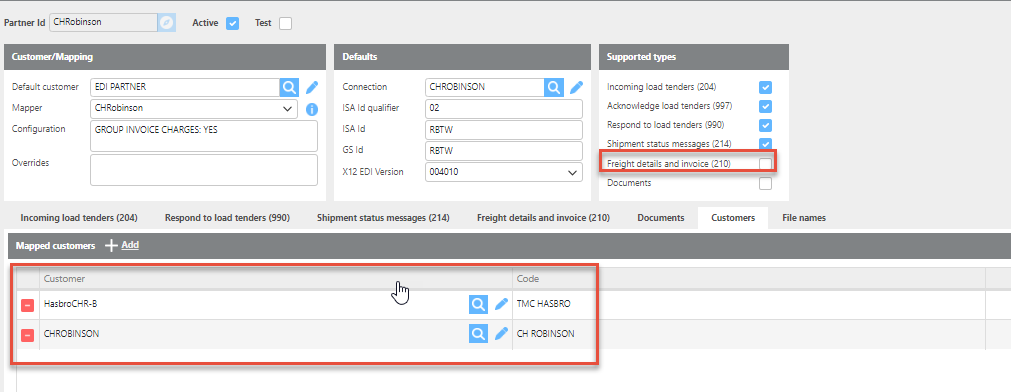
Main Partner – CH Robinson
-
Handles incoming 204 load tenders and outgoing 990/214 files.
-
210 invoices are not sent through this partner profile.
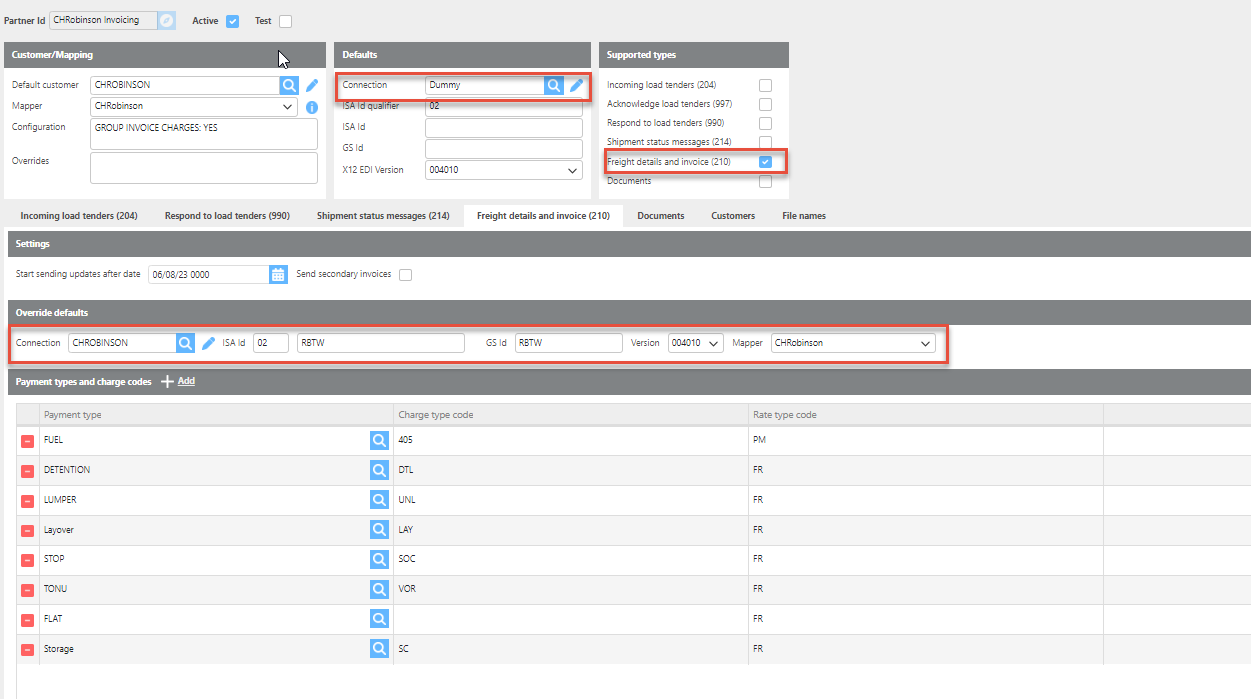
CH Robinson Invoicing Partner
-
Uses a dummy connection in the defaults section to avoid interfering with incoming 204s.
-
The 210 tab is configured with the CH Robinson-specific invoicing connection and settings.
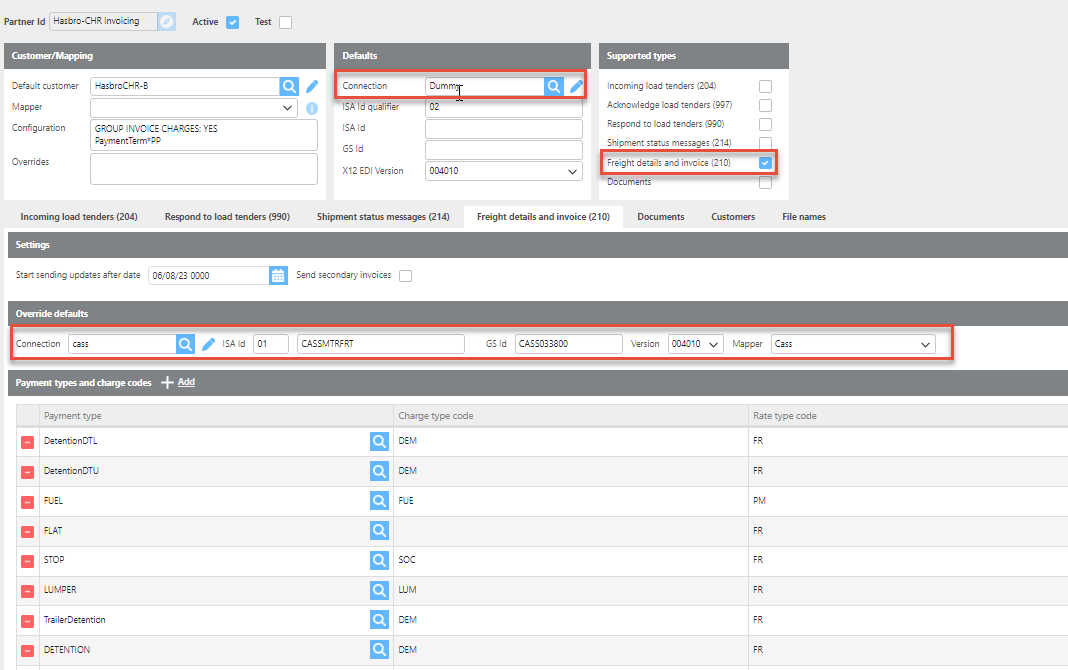
Hasbro-CHR Invoicing Partner
-
Uses a dummy connection in the defaults section to avoid interfering with incoming 204s.
-
The 210 tab is configured with the Cass invoicing connection and settings.
Note: For each additional invoicing partner, repeat this setup using the appropriate invoicing connection on the 210 tab.