What You Should Know About Settlement Deduction Data Integration
-
Ditat TMS will request an updated Chart of Accounts and Item List from QuickBooks before each sync.
-
Ditat TMS does not retrieve vendor information from QuickBooks — it only creates and updates vendors.
-
Before exporting, Ditat TMS checks whether a vendor with the same Accounting ID already exists in QuickBooks. If it does, the vendor record will be updated with any new information. If it does not, a new Vendor will be created using the Accounting ID as the vendor name.
-
Ditat TMS checks whether a Vendor Bill with the same reference number already exists in QuickBooks. If it does, the bill will not be exported.
-
If a duplicate Vendor Credit is found in QuickBooks, Ditat TMS will mark it as exported and log a warning in the export report.
-
Ditat TMS only exports certain fields to QuickBooks (see below). All other fields in QuickBooks can be modified independently and will not be affected by the export.
-
Transaction numbers are sent in the format
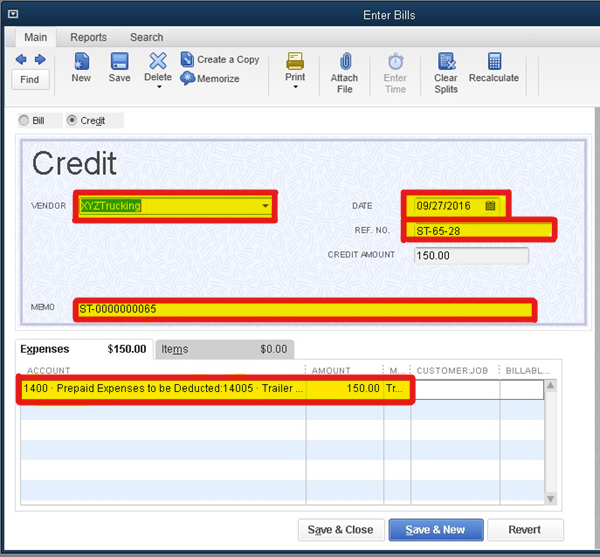
ST-[Settlement Number]-[Sequence]. For example,ST-65-27indicates Settlement 65, transaction 27.
For frequently asked questions about sync warnings and errors, click here.
Fields Exported to QuickBooks
Header Data
|
Ditat TMS Field |
QuickBooks Field |
Notes |
|---|---|---|
|
Accounting ID |
Vendor Name |
Allows QuickBooks to pull the vendor's address and related information. |
|
Credit Date |
Credit Date |
|
|
Transaction Number |
Reference Number |
Sent in |
|
Settlement Number |
Memo |
|
Detail Data
|
Ditat TMS Field |
QuickBooks Field |
Notes |
|---|---|---|
|
Deduction |
Vendor Credit |
|
|
Description |
Memo |
|
|
Deduction Amount |
Amount Owed |
|