What you should know about the Settlements Expense data integration?
-
Ditat will request an updated Chart Of Accounts and Item List from QuickBooks.
-
Ditat TMS does not retrieve Vendors from QuickBooks.
-
Ditat TMS only creates and updates Vendors in QuickBooks.
-
Ditat will check if a Vendor already exists in QuickBooks if it does it will update any new information about The Vendor if it doesn't It will create a new Vendor using the Accounting ID as the Vendor Name.
-
Ditat TMS will check if a Vendor Bill with the same Ref Number already exists if it does - it won't export.
-
If a Vendor Bill already exists in QuickBooks (with the same number) - Ditat TMS will mark it as exported and write a warning in the export report.
-
Ditat TMS only sends certain fields to QuickBooks (see below). Other fields can be changed/added in QuickBooks and will not be affected by export.
-
Due to the QuickBooks 11 Character limit, Ditat TMS will shrink the Vendor Bill ID to be in compliance. SB-0000123456-01 will transfer as 12 3456-01 to QuickBooks.
Fields exported to QuickBooks
Header Data
-
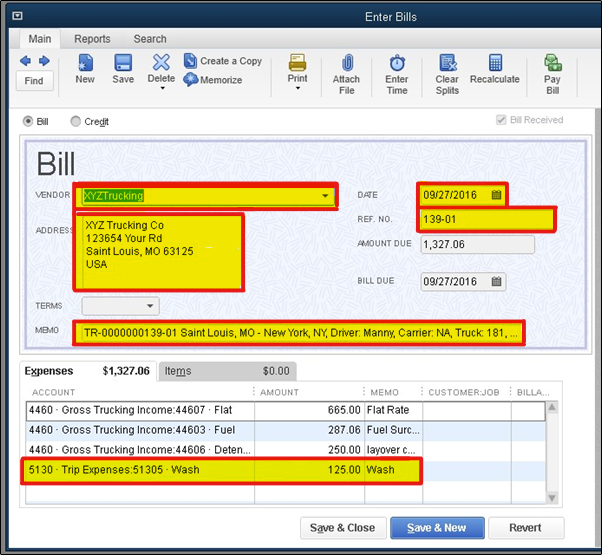
Accounting id will be sent with Vendor Bill, this will show up in QuickBooks as Vendor Name. This will allow QuickBooks to pull all of the addresses and related info.
-
Bill Date.
-
The Trip Number from Ditat TMS will be sent to a Reference Number field in QuickBooks.
-
Trip number, Pickup and Delivery Cities, Driver Number, Carrier information, Truck, and Trailer number will be mapped to the Memo field in QuickBooks.
Details Data
-
Expenses will be entered into QuickBooks as a Billable Item. This Expense is mapped to a Cost Of Good Sold Account in QuickBooks.
-
The description fields will be mapped to the Memo.
-
Expense amounts will be mapped to the Amount Owed field in QuickBooks.