
Navigation: Rate & Pay → Set Up Options → Advance Processing Rules
Advance processing rules automatically adjust advance amounts upon importing based on preset rules.
Advance processing rules

|
Field |
Description |
|
Sequence |
Displays the order in which rules will be applied to imported advances. |
|
Advance type |
Displays the advance type that will be adjusted by this rule. |
|
Condition |
Displays a checkmark if a condition is required for this rule to apply. |
|
Quantity |
Displays the quantity setting from the rule. |
|
Apply |
Displays how the rule is set to apply to the advance. |
|
Rate |
Displays the rate set for this rule. |
|
To deduct |
Checked if the adjusted amount is to be deducted from the driver or carrier settlement. |
|
To export |
Checked if the adjusted amount is to be exported to your accounting software. |
|
Description |
Displays the rule's description. |
Rule Set Up
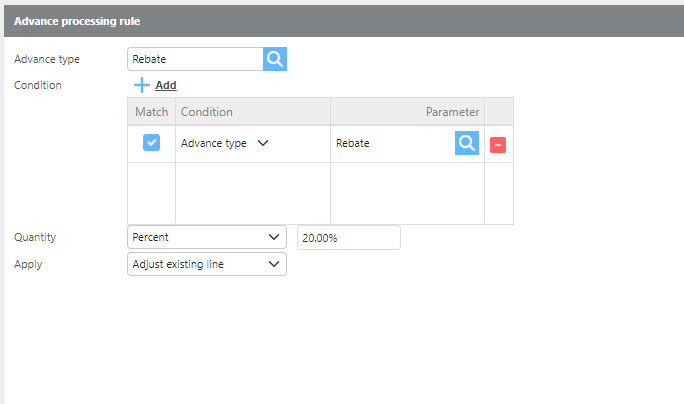
|
Field |
Description |
|
Advance type |
Select the advance type this rule should apply to. |
|
Condition |
Select the conditions that must be met for this rule to apply. |
|
Quantity |
Select the quantity type: Default, Fixed, or Percentage. |
|
Apply |
Select how the rule should be applied. Choose Adjust Existing Line to modify the existing advance line, or Add New Line to add a new advance line. |
|
Rate |
If quantity is set to Default or Fixed, enter the rate amount to adjust by. |
|
Description |
Enter a description for this rule. |
|
Deduct |
Check this box if the adjusted amount should be deducted from the driver or carrier settlement. |
|
Export |
Check this box if the adjusted amount should be exported to your accounting software. |