
This report displays a list of trips with scheduled and actual arrival and departure times, along with miles per load. This report can be run for drivers, trucks, or trailers.
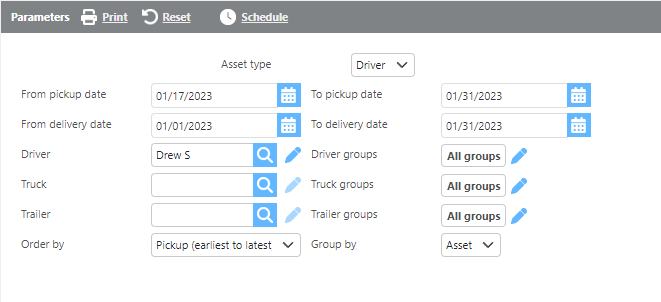
Report Parameters
|
Field |
Description |
|
Asset type |
Select the type of asset to report on: Driver, Truck, or Trailer. |
|
From/To pickup date |
Enter a pickup date range to filter results. |
|
From/To delivery date |
Enter a delivery date range to filter results. |
|
Driver |
Select a specific driver to filter results. |
|
Driver groups |
Select a driver group to filter results. |
|
Truck |
Select a specific truck to filter results. |
|
Truck groups |
Select a truck group to filter results. |
|
Trailer |
Select a specific trailer to filter results. |
|
Trailer groups |
Select a trailer group to filter results. |
|
Order by |
Select how the results should be ordered. |
|
Group by |
Select how the results should be grouped. |
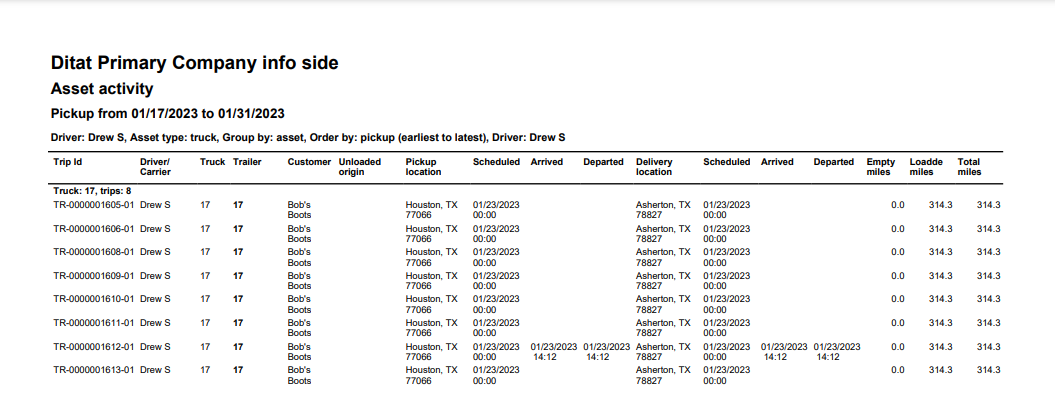
Report Columns
|
Field |
Description |
|
Trip Id |
The trips the asset was assigned to. |
|
Driver/Carrier |
The driver or carrier assigned to the trip. |
|
Truck |
The truck assigned to the trip. |
|
Trailer |
The trailer assigned to the trip. |
|
Customer |
The customer associated with the shipment. |
|
Unloaded origin |
The unloaded origin from the trip. |
|
Pickup location |
The pickup location. |
|
Scheduled |
The scheduled pickup time. |
|
Arrived |
The actual pickup arrival time. |
|
Departed |
The actual pickup departure time. |
|
Delivery location |
The delivery location. |
|
Scheduled |
The scheduled delivery time. |
|
Arrived |
The actual delivery arrival time. |
|
Departed |
The actual delivery departure time. |
|
Empty miles |
The empty miles for the trip. |
|
Loaded miles |
The loaded miles for the trip. |
|
Total miles |
The total miles for the trip. |