
This report lists assets that are currently moving according to GPS data but are not assigned to a trip that corresponds to their current location or the time of their most recent GPS ping.
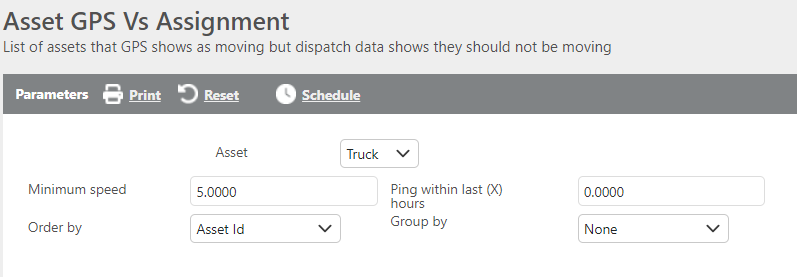
Report Parameters
|
Field |
Description |
|
Asset |
Select which asset type to run the report for: Truck or Trailer. |
|
Minimum speed |
Enter the minimum speed threshold to filter results. Only assets moving at or above this speed will display. |
|
Ping within last X hours |
Enter the number of hours within which a GPS ping must have occurred to be included in the report. |
|
Order by |
Select how the results should be ordered. |
|
Group by |
Select how the results should be grouped. |
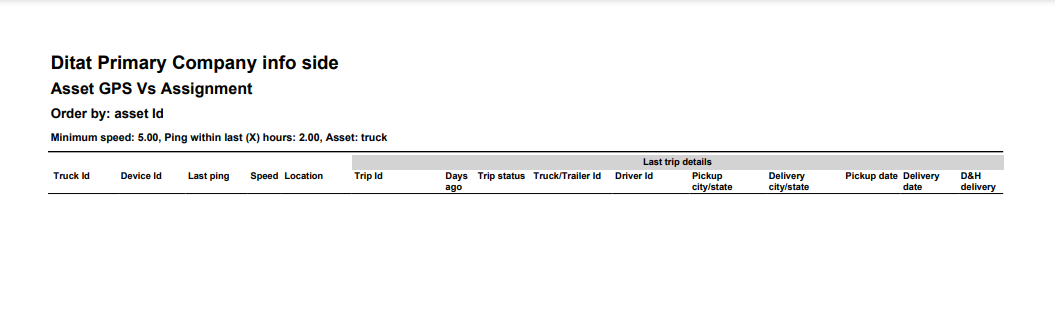
Report Columns
|
Field |
Description |
|
Truck Id |
The asset ID that is currently moving according to the set parameters. |
|
Device Id |
The device ID associated with the moving asset. |
|
Last ping |
The time of the most recent GPS ping. |
|
Speed |
The speed the asset was traveling at the time of the last GPS ping. |
|
Location |
The location where the last GPS ping occurred. |
|
Trip Id |
The trip ID of the last trip the asset was assigned to. |
|
Days ago |
The number of days ago the last trip was completed. |
|
Trip Status |
The status of the last trip: Assigned, Enroute, or Complete. |
|
Truck/Trailer Id |
The truck or trailer ID associated with the last trip assignment. |
|
Pickup city/state |
The pickup city and state from the most recently assigned trip. |
|
Delivery city/state |
The delivery city and state from the most recently assigned trip. |
|
Pickup date |
The pickup date from the most recently assigned trip. |
|
Delivery date |
The delivery date from the most recently assigned trip. |
|
D&H delivery |
Indicates whether the most recently assigned trip was a drop and hook delivery. |