
This report will show a list of assets without a GPS ping for a specified amount of time.
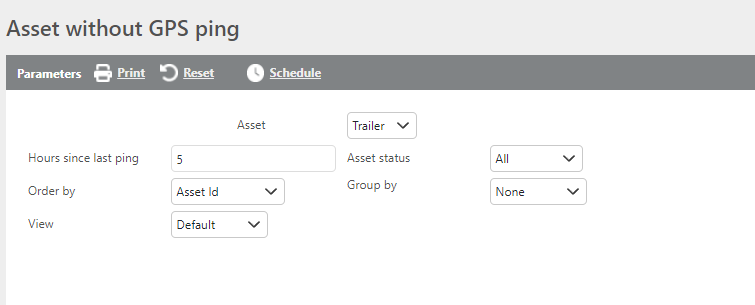
Report Parameters
|
Field |
Description |
|
Asset |
Select whether to run the report for Trucks or Trailers. |
|
Hours since last ping |
Enter the number of hours since the last ping. Only assets exceeding this threshold will display. |
|
Asset status |
Select which asset status to filter results by, or leave as All. |
|
Order By |
Select how the results should be ordered. |
|
Group by |
Select whether to group results by status, location ID, or city/state. |
|
View |
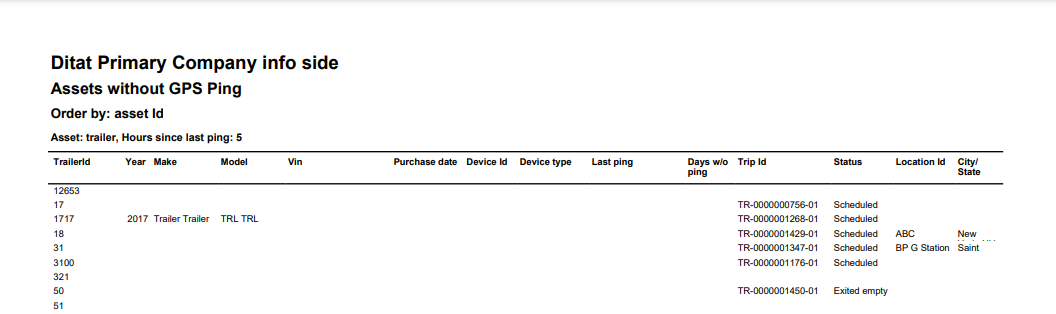
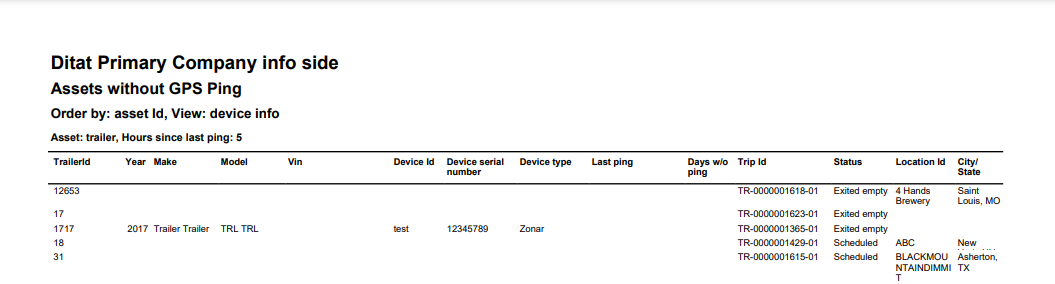
Select Default View or Device Info View. See column details below. |
Default View
Device Info View
|
Field |
Description |
|
TrailerId |
The trailer ID. |
|
Year |
The trailer's year. |
|
Make |
The trailer's make. |
|
Model |
The trailer's model. |
|
Vin |
The trailer's VIN. |
|
Purchase date |
The purchase date from the trailer profile, if entered. |
|
Device Id |
The tracking device ID. |
|
Device Serial Number (Device Info view only) |
The tracking device serial number. |
|
Device Type |
The type of tracking device.The date and time of the last GPS ping. |
|
Last Ping |
The date and time of the last GPS ping. |
|
Days w/o ping |
The number of days since the last GPS ping. |
|
Trip Id |
The trip ID the asset is currently assigned to, if applicable. |
|
Status |
The asset's current trip status, if assigned to a trip. |
|
Location Id |
The location ID the asset is heading to or departing from, if assigned to a trip. |
|
City/State |
The city and state of the location ID, if a location ID is listed. |