
This report provides visibility into tracked brokered shipments.
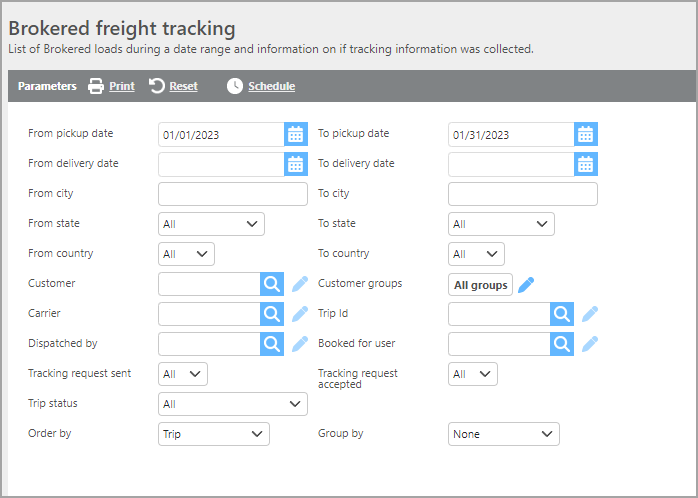
Report Parameters
|
Field |
Description |
|
From/To pickup date |
Specify a pickup date range to filter results. |
|
From/To delivery date |
Specify a delivery date range to filter results. |
|
From/To city |
Specify a pickup or delivery city to filter results. |
|
From/To State |
Specify a pickup or delivery state to filter results. |
|
From/To Country |
Specify a pickup or delivery country to filter results. |
|
Customer |
Filter results by a specific customer. |
|
Customer groups |
Filter results by a specific group of customers. |
|
Carrier |
Filter results by a specific carrier. |
|
Trip Id |
Enter a specific Trip ID to view tracking information for that trip. |
|
Dispatched by |
Filter results by the user who dispatched the trip. |
|
Booked for user |
Filter results by the user for whom the shipment was booked. |
|
Tracking request sent |
Filter by tracking request status: All, Yes, or No. |
|
Tracking request accepted |
Filter by tracking acceptance status: All, Yes, or No. |
|
Trip status |
Narrow results by a specific trip status or select ‘All’. |
|
Order by |
Select how you would like the results to be ordered. |
|
Group by |
Select how you would like the results to be grouped. |
Reportable data is stored for 6 months.
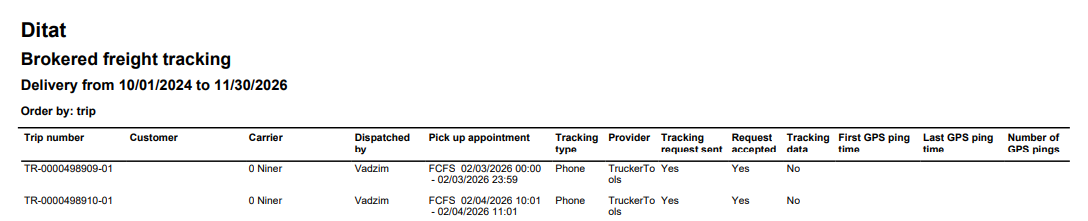
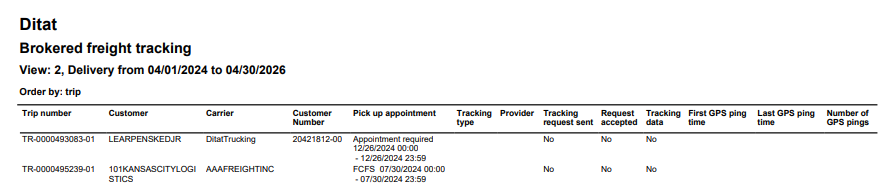
Report Columns
|
Field |
Description |
|
Trip number |
The trip number will be listed in this column. |
|
Customer |
The customer being billed will be listed in this column. |
|
Carrier |
The carrier assigned to the trip will be listed in this column. |
|
Customer Number (Ref 1) |
(View 2 only) Reference number 1 from the shipment. |
|
Dispatched by |
The dispatched by user will be listed in this column. |
|
Pick up Appointment |
The pickup appointment will be listed in this column. |
|
Tracking type |
This field will display if the load was tracked via phone or eld. |
|
Provider |
This field will display the tracking provider used. |
|
Booked for user |
The booked for user from the shipment will be listed here. |
|
Tracking request sent |
This column will show if the tracking request was sent or not. |
|
Request accepted |
This column will show if the tracking request was accepted or not. |
|
Tracking data |
This column will show if tracking data has been received or not. |
|
First GPS ping time |
This column will display the first received GPS ping time. |
|
Last GPS ping time |
This column will display the last received GPS ping time. |
|
Number of GPS pings |
This column will display the total number of GPS pings received. |