
This report displays a list of trips completed for a customer during the selected time frame, including status, stop locations, and arrival and departure times.
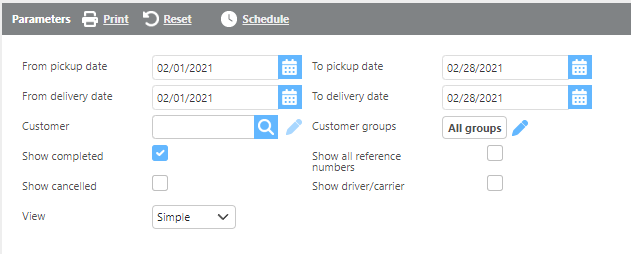
Report Parameters
|
Field |
Description |
|
From/To pick up date |
Here select a pickup date range. |
|
From/To delivery date |
Here select a delivery date range. |
|
Customer |
If a customer is selected, you will only see data for that customer. |
|
Customer groups |
If a customer group is selected, you will only see data for that custom group. |
|
Show completed |
Check this box if completed loads should show. |
|
Show all reference numbers |
Check this box if all reference numbers should be displayed. |
|
Show cancelled |
Check this box if cancelled shipments should be displayed. |
|
Show driver/carrier |
Check this box if the driver/carrier should be displayed. |
|
View |
Here choose between the simple and extended view. |
Simple:

Report Columns Simple View
|
Field |
Description |
|
Reference number |
The reference numbers from the shipment. |
|
Truck/Trailer |
The truck and trailer assigned to the load. |
|
Status |
The load's current status. |
|
GPS Location |
The most recent GPS location ping for the load. |
|
Location |
Each stop's location information. |
|
Scheduled |
The scheduled appointment time for the stop. |
|
Arrived |
The arrival check call time for the stop. |
|
Departed |
The departure check call time for the stop. |
Extended:

|
Field |
Description |
|
Shipment |
The shipment number. |
|
Dispatcher |
The user who dispatched the load. |
|
Reefer temp |
The reefer temperature set on the shipment. |
|
Status |
The load's current status. |
|
Current GPS location |
The most recent GPS location ping for the load. |
|
PO Number |
The reference number from the shipment. |
|
Truck |
The truck assigned to the load. |
|
Trailer |
The trailer assigned to the load. |
|
Stop Type |
The type of stop: Pickup or Delivery. |
|
Stop reference numbers |
The reference numbers specific to each stop. |
|
Location |
Each stop's location information. |
|
Scheduled |
The scheduled appointment time for the stop. |
|
Arrived |
The arrival check call time for the stop. |
|
Departed |
The departure check call time for the stop. |
|
Check Call Note |
The note from the check call at this stop. |