

This report will show changes made to deductions and who made them.
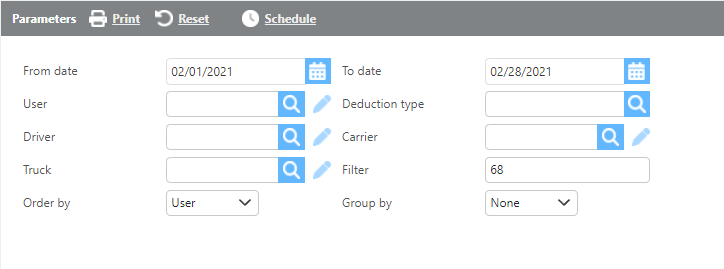
|
Field |
Description |
|
From/To date |
Here enter a date range for data the report should audit. |
|
User |
Here if a user is selected, the report will audit that user's changes. |
|
Deduction type |
Here if a deduction type is selected, the report will audit changes to that deduction. |
|
Driver |
Here if a driver is selected, the report will audit that driver's deduction changes. |
|
Carrier |
Here if a carrier is selected, the report will audit that carrier's deduction changes. |
|
Truck |
Here if a truck is selected, the report will audit deductions associated with that truck. |
|
Filter |
A deduction number can be entered here to only see changes made to that deduction. |
|
Order by |
Here select how data should be ordered on this report. |
|
Group by |
Here select how the data should be grouped on this report. |
|
Field |
Description |
|
Date |
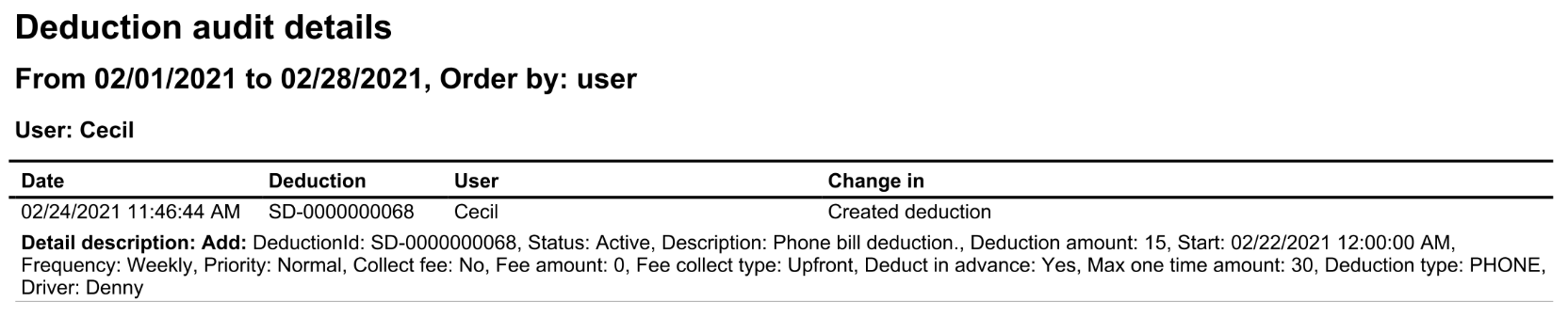
This field will display the date and time of the change made to the deduction. |
|
Deduction |
This field will display the deduction Id. |
|
User |
This field will display the user the deduction is for. |
|
Change in |
This field will display the change made to the deduction. |
|
Detail description |
This field will display a detailed description of changes made. |