
This report displays the count of loads a driver has delivered and the percentage of scans and check calls submitted. It also tracks the timeliness of check calls, trailer inspections, and the inclusion of inspection photos.
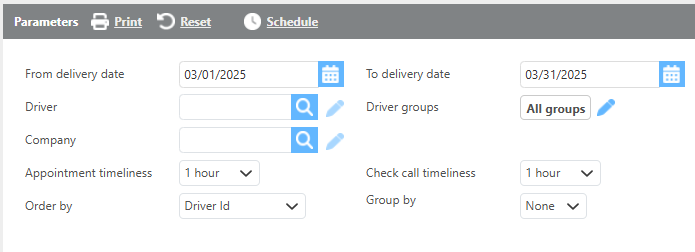
Report Parameters
|
Field |
Description |
|
From/To delivery date |
Select the date range for the loads this report should provide. |
|
Driver |
Select a specific driver to run this report for. |
|
Driver groups |
Select a driver group to run this report for. |
|
Company |
Filter the report by driver ‘Pay by’ company. |
|
Appointment timelines |
Refers to how close the added check call is to the actual appointment time. |
|
Check call timeliness |
This field refers to how close the time the sent check call-in was to the appointment time. For example, if the check call was sent in that they arrived at the pickup location at 2:00 PM but they sent that check call in at 4:00 PM that is a 2 hour window or check call timeliness of 2 hours. |
|
Group by |
Select from the drop-down if/how you would like the information grouped. |
|
Order by |
Select from the drop-down how you would like the information ordered. |
View 1

View 2

Report Columns
|
Field |
Description |
|
Driver Id |
Driver's unique ID |
|
Driver |
Driver’s name |
|
Loads delivered |
The total number of loads completed. |
|
Loads with scans submitted |
The percentage of loads with a scan submitted. |
|
Check calls submitted |
The percentage of loads with check calls submitted. |
|
On time check calls |
The percentage of check calls submitted on time. |
|
Check call timeliness |
The percentage of loads with the check call inside the timeliness range. |
|
Trailer inspections completed |
The percentage of loads with trailer inspections completed |
|
Trailer inspections with pictures |
The percentage of trailer inspections that included pictures. |
|
Avg Pictures per inspection |
The average number of pictures provided per inspection. |