
EDI Load Tender History
This EDI report will give a list of load tenders for a specified date rage using the parameters selected.
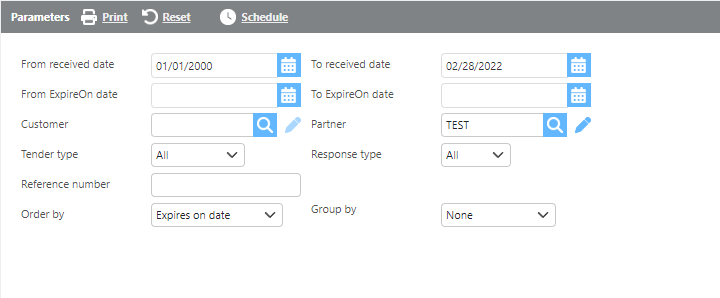
EDI Load Tender History Parameters
Report Parameters
Field | Description |
From/To received date | Select a date range to filter tenders by the date they were received. |
From/To ExpireOn date | Select a date range to filter tenders by their expiration date. |
Customer | Select a specific customer to filter results, or leave blank to include all. |
Partner | Select a specific partner to filter results, or leave blank to include all. |
Tender type | Select the type of load tenders to display from the drop-down menu. |
Response type | Select the response type to filter which tenders are displayed. |
Reference number | Enter a specific reference number to filter the report. |
Order by | Select how you would like the results ordered. |
Group by | Select how you would like the results grouped. |
View 1

Goodship View

View 3 export

Report Columns
Field | Description |
EDI Partner | The name of the EDI Partner. |
Customer Id | The ID associated with the customer. |
Date received | The date the tender was received. |
Expires on | The date the tender is set to expire. |
Pickup | The pickup information for the tender. |
Delivery | The delivery information for the tender. |
References | The reference number(s) associated with the tender. |
Units | The number of units specified in the tender. |
Weight | This field will display the weight from the tender. |
Response | The recorded response to the tender. |
Shipment | The Shipment ID created from the tender. |