
This report will show a list of all expirations that will happen during a selected date range. The report will allow you to select specific expiration types and only show those.
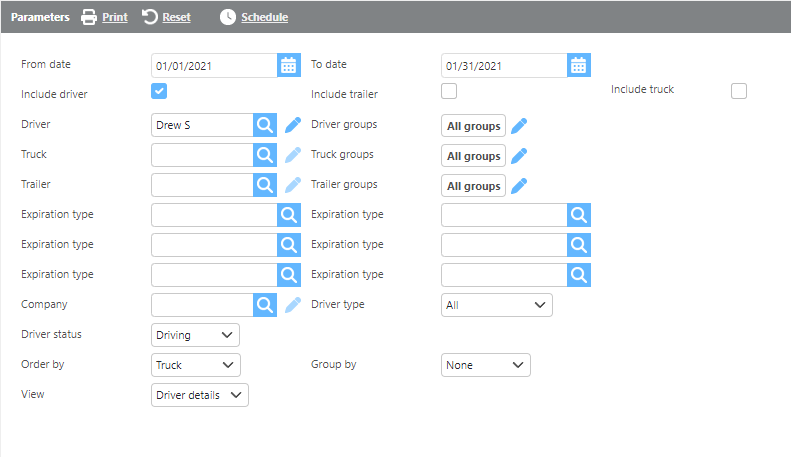
Report Parameters
|
Field |
Description |
|
From/To date |
Enter a date range and expirations in the date range will display on the report. |
|
Include driver |
Check this box if driver expirations should display. |
|
Include trailer |
Check this box if trailer expirations should display. |
|
Include truck |
Check this box if truck expirations should display. |
|
Driver |
Select a driver here to only see their expirations. |
|
Truck |
Select a truck here to only see that truck's expirations. |
|
Trailer |
Select a trailer here to only see that trailer's expirations. |
|
Groups |
Select a custom group here to only see that group's expirations. |
|
Expiration type |
Select an expiration type and only that expiration will show on the report. |
|
Company |
Select a company and only expirations for that company will display. |
|
Driver type |
Select a driver type and only drivers with that type will display on the report. |
|
Driver status |
Select a driver status and only drivers with that status will display on the report. |
|
Order by |
Select how the report should be ordered. |
|
Group by |
Select from the drop-down if/how you would like the report grouped. |
|
View |
Select the default or driver details view. |
Report Columns
Default View

|
Field |
Description |
|
Driver/Truck/Trailer |
The driver, truck, or trailer Id. |
|
Carrier |
The carrier Id. |
|
Date |
The date of the expiration. |
|
Description |
The description of the deduction. |
|
Notes |
The notes associated with the expiration type. |
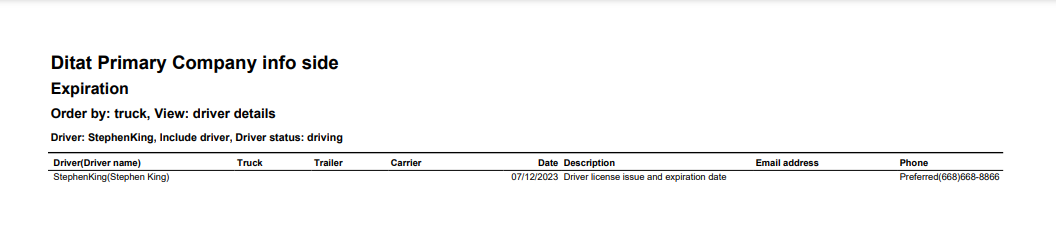
Driver Details View
|
Field |
Description |
|
Driver/Truck/Trailer |
The driver, truck, or trailer Id. |
|
Carrier |
The carrier Id. |
|
Date |
The date of the expiration. |
|
Description |
The description of the deduction. |
|
Email address |
Driver email address will be shown here. |
|
Phone number |
Driver phone number will be shown here. |