
This report will show the asset id with their insurance company, type, and policy number. The report will also show start and end dates with coverage and deductible amounts.
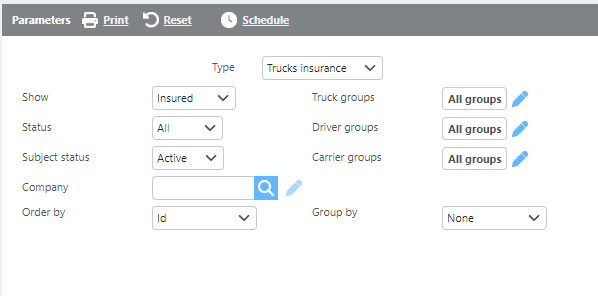
Report Parameters
|
Field |
Description |
|
Type |
Select if this should be run for truck, trailer, or driver insurance. |
|
Show |
Select which types of assets should display. |
|
Status |
Select if expired, current, or all types of insurance should show. |
|
Subject status |
Select if active, inactive, or all types of assets should display. |
|
Groups |
Select a group and only data from that group will display. |
|
Company |
Select a company and only data from that company will display. |
|
Order by |
Select from the drop-down how you would like the data ordered on the report. |
|
Group by |
Select from the drop-down if/how you would like the report grouped. |

Report Columns
|
Field |
Description |
|
ID |
The asset's Id. |
|
Insurance company |
The insurance company of the asset. |
|
Insurance type |
The insurance type of the asset. |
|
Policy number |
The insurance policy number. |
|
Start date |
The insurance policy start date. |
|
End date |
The insurance policy end date. |
|
Total coverage |
The insurance policy's total coverage. |
|
Deductible |
The insurance deductible. |