
This report displays payment, deduction, expense, and advance types in Ditat along with their accounting software mappings. This report is useful for verifying that all types and accounts have been properly mapped in your accounting software before running a sync.
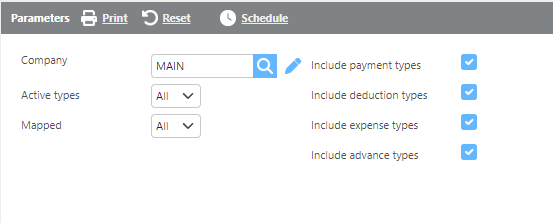
Report Parameters
|
Field |
Description |
|
Company |
Select which Ditat company the data should display for. |
|
Active types |
Select whether to display Active, Inactive, or All types. |
|
Mapped |
Select whether to display Mapped, Unmapped, or All types. |
|
Include payment types |
Check this box to include payment types in the report. |
|
Include deduction types |
Check this box to include deduction types in the report. |
|
Include expense types |
Check this box to include expense types in the report. |
|
Include advance types |
Check this box to include advance types in the report. |
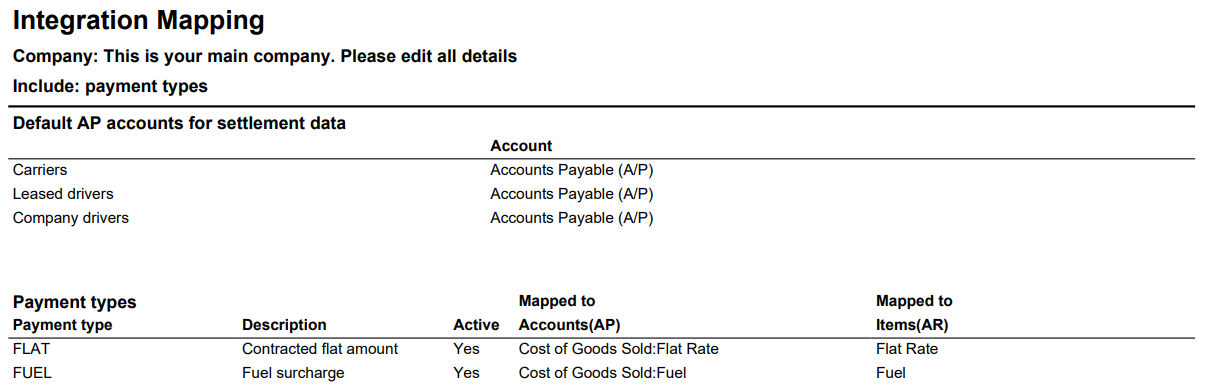
|
Field |
Description |
|
Payment type |
The payment, advance, expense, or deduction type in Ditat. |
|
Description |
The description of the data type. |
|
Active |
Indicates whether the type is currently active. |
|
Mapped to Accounts (AP) |
The accounts payable account this type is mapped to in your accounting software. |
|
Mapped to Items (AR) |
The accounts receivable item this type is mapped to in your accounting software. |