
This report displays a list of all posted invoices with each payment type for the selected date range.
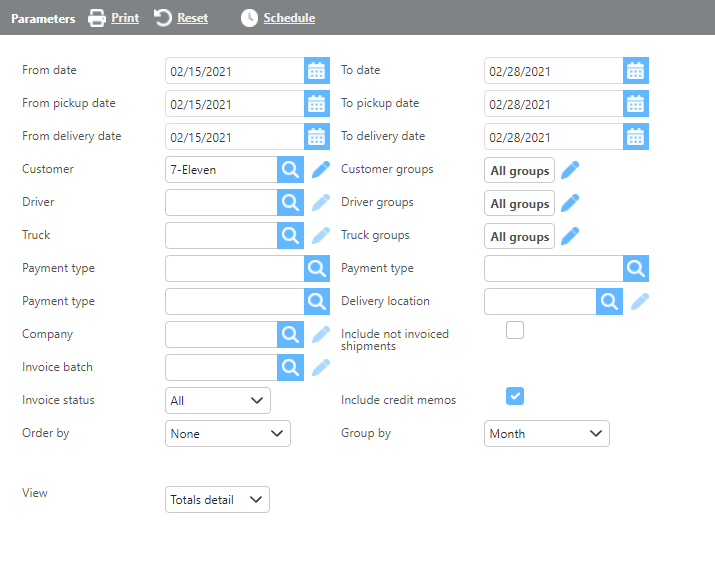
Report Parameters
|
Field |
Description |
|
From/To date |
Enter a date range to filter results by invoice date. |
|
Pickup From/To date |
Enter a date range to filter results by pickup date. |
|
Delivery From/To date |
Enter a date range to filter results by delivery date. |
|
Customer |
If a customer is selected, only data for that customer will display. |
|
Customer Group |
If a customer group is selected, only data for that group will display. |
|
Driver |
If a driver is selected, only data for that driver will display. |
|
Driver groups |
If a driver group is selected, only data for that driver group will display. |
|
Truck |
If a truck is selected, only data for that truck will display. |
|
Truck groups |
If a truck group is selected, only data for that truck group will display. |
|
Payment type |
If a payment type is selected, only data for that payment type will display. |
|
Company |
If a company is selected, only data for that company will display. |
|
Include not invoiced shipments |
Check this box to include shipments that have not yet been invoiced. |
|
Invoice status |
Select the invoice status to filter results: All, Not Paid, Fully Paid, Partially Paid, or Overpaid. |
|
Invoice batch |
Enter a batch number to narrow results to a specific invoice batch. |
|
Delivery location |
If a delivery location is selected, only data with that delivery location will display. |
|
Group by |
Select how the data should be grouped on the report. |
|
View |
Select which view to use. See view descriptions and examples below. |
Report Views
|
View |
Description |
|---|---|
|
Default |
Displays standard invoice summary information. |
|
Details |
Displays all five reference fields from the shipment. Best exported to Excel for readability. |
|
Stops Details |
Displays stop-level information including stop type, location, and miles. |
|
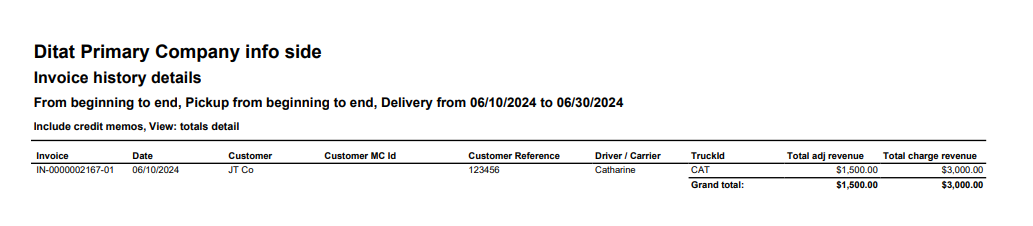
Totals Detail |
Displays customer MC number, customer reference, and driver/carrier information alongside totals. |
|
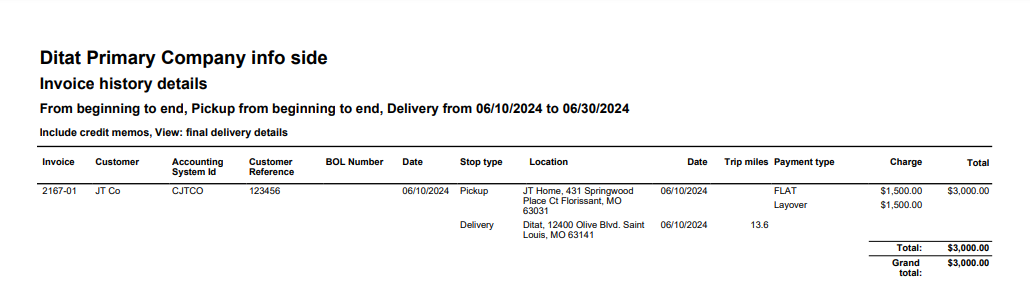
Final Delivery Details |
Displays final delivery information for the shipment. |
|
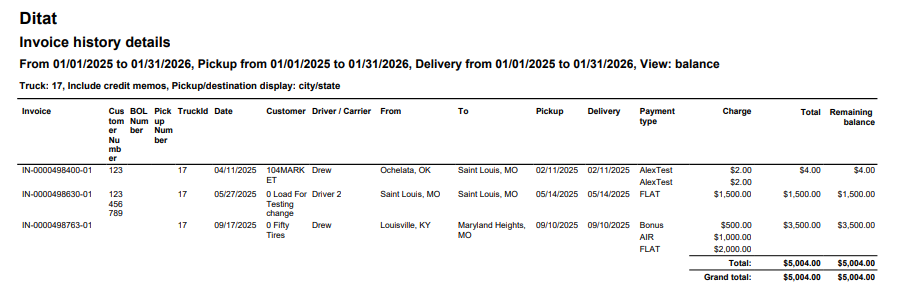
Balance |
Displays invoice balance information. |
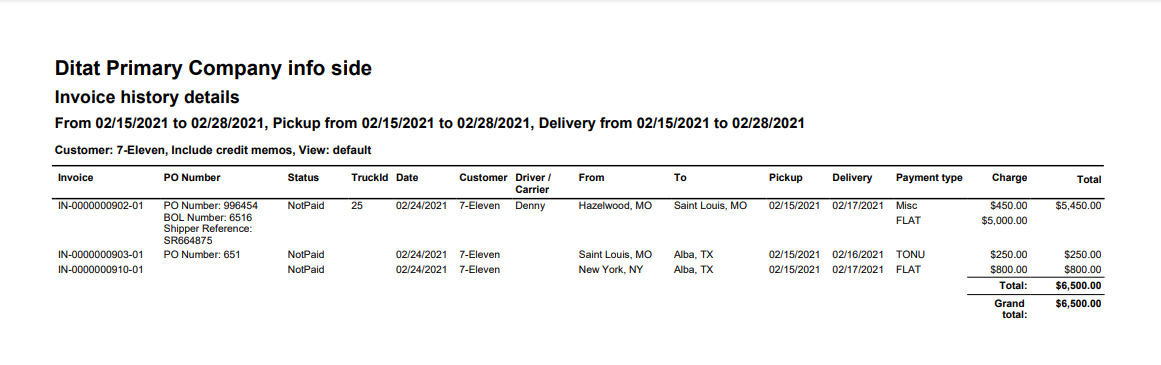
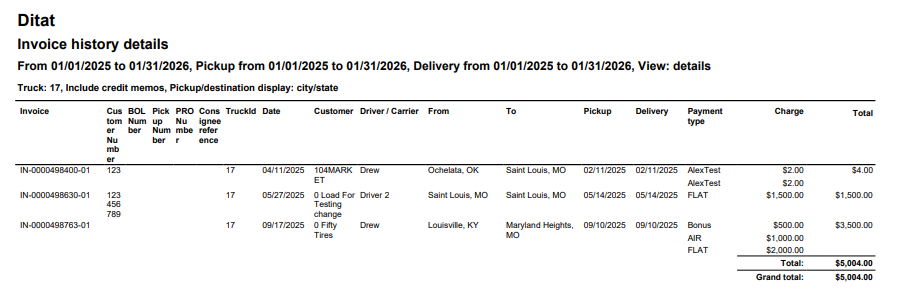
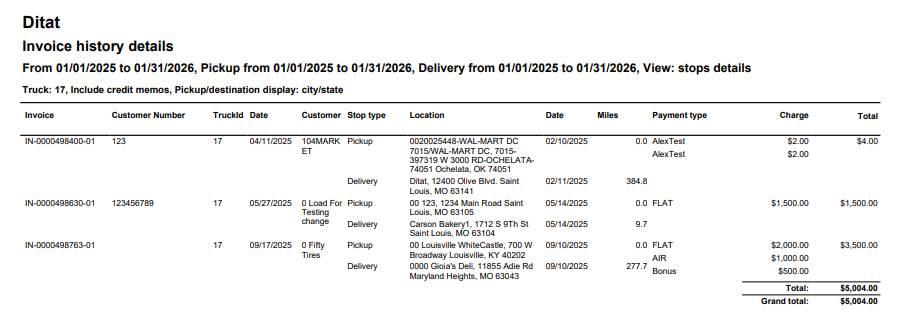
Report Views
|
Field |
Description |
|
Invoice |
The invoice ID. |
|
Reference fields |
Default/Stops Details — Displays reference field 1 from the shipment. Details — Displays all five reference fields from the shipment. |
|
Status |
The invoice status. Displayed on the Default view. |
|
Truck Id |
The truck ID for the load. |
|
Date |
The invoice date. |
|
Customer |
The customer ID for the load. |
|
Stop Type (Stops Details view) |
Indicates whether the stop is a pickup or delivery. |
|
Location (Stops Details view) |
The pickup and delivery locations from the shipment. |
|
Miles (Stops Details view) |
The miles from the shipment. |
|
Customer MC Id (Totals view) |
The customer's MC number. |
|
Customer reference (Totals view) |
The customer reference from the shipment. |
|
Driver/Carrier (Totals view) |
The driver or carrier assigned to the load. |
|
Driver/Carrier |
The driver or carrier assigned to the load. |
|
From |
The pickup city and state. |
|
To |
The delivery city and state. |
|
Pickup |
The pickup date. |
|
Delivery |
The delivery date. |
|
Payment type |
The charge type used on the shipment. |
|
Charge |
The charge amount for this payment type. |
|
Total |
The total amount billed for the load. |