
This report displays a list of all posted invoices with totals for the selected date range.
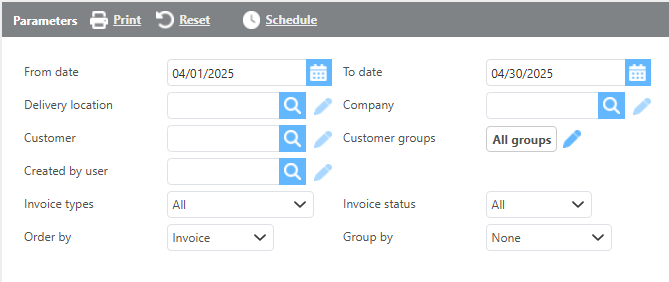
Report Parameters
|
Field |
Description |
|
From/To date |
Enter a date range to filter invoices by invoice date. |
|
Delivery location |
If a delivery location is selected, only invoices with that delivery location will display. |
|
Company |
If a company is selected, only invoices for that company will display. |
|
Customer |
If a customer is selected, only invoices for that customer will display. |
|
Customer groups |
If a customer group is selected, only invoices for that group will display. |
|
Created by user |
Filters the report to show only invoices from batches created by the selected user. |
|
Invoice types |
Select which types of invoices should be included in the report. |
|
Invoice status |
Select the invoice status to filter results: All, Not Paid, Fully Paid, Partially Paid, or Overpaid. |
|
Group by |
Select how the data should be grouped on the report. |
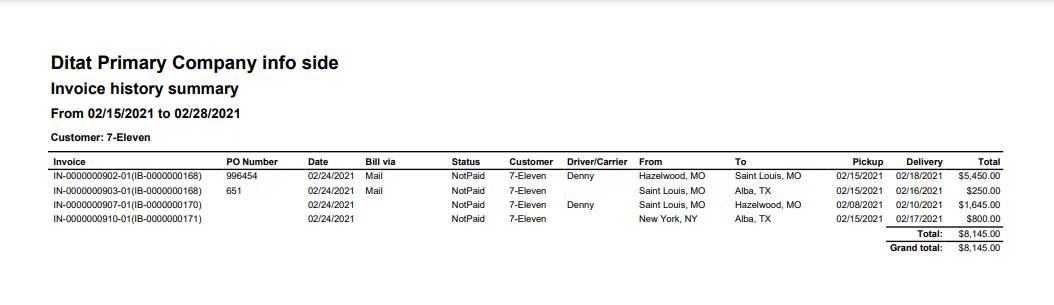
Report Columns
|
Field |
Description |
|
Invoice |
The invoice ID and batch number. |
|
PO Number |
The PO number from the shipment. |
|
Date |
The invoice batch date. |
|
Bill via |
The billing method for the invoiced customer. |
|
Status |
The payment status of the invoice: Not Paid, Fully Paid, Partially Paid, or Overpaid. |
|
Customer |
The customer being invoiced. |
|
Driver/Carrier |
The driver or carrier assigned to the load. |
|
From |
The pickup city and state from the shipment. |
|
To |
The delivery city and state from the shipment. |
|
Pickup |
The pickup date from the shipment. |
|
Delivery |
The delivery date from the shipment. |
|
Total |
The total billable amount on the invoice. |