
Navigation: Rate & Pay → Comdata
Click here for information on how to use a data entry window.
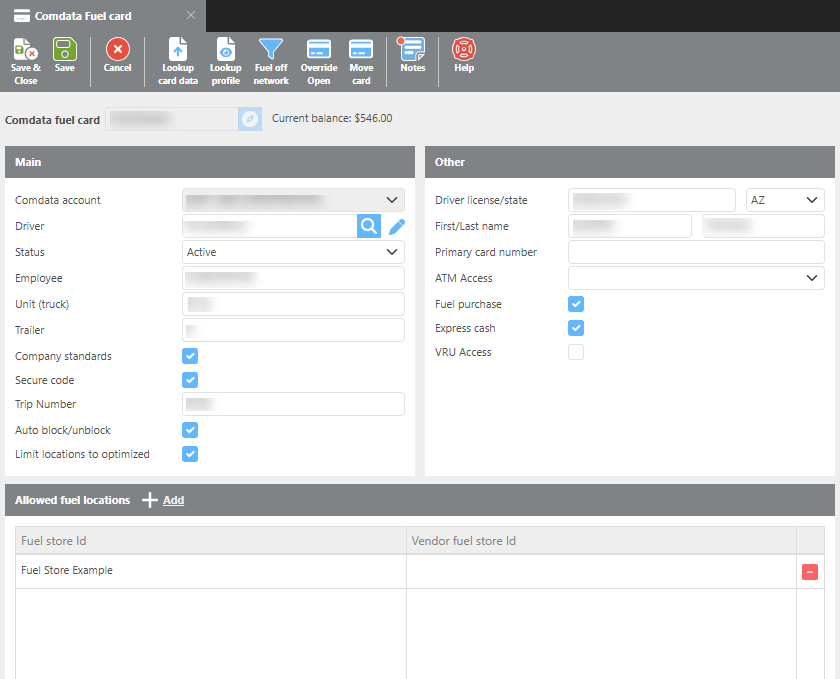
Toolbar Actions
|
Field |
Description |
|---|---|
|
Lookup Card Data |
Updates the card record with the latest data from Comdata. |
|
Lookup Profile |
Updates the card record with the latest data from Ditat. |
|
Fuel Off Network |
When authorized, allows the card to be used for fueling outside the Comdata-defined fuel network. |
|
Override Open |
When authorized, opens a closed card for 24 hours. This is used when cards are managed and closed through the Rate & Pay Setup Options screen. |
Card Details
|
Field |
Description |
|
Comdata fuel card |
Use the lookup to search for and select a fuel card. |
|
Current balance |
Displays the current balance on the card. |
|
Comdata account |
Identifies the Comdata account this fuel card is associated with. |
|
Driver |
The driver assigned to this fuel card. |
|
Status |
The current status of the card: Active, Blocked, Clear, Deleted, or Lost. |
|
Employee |
Enter the associated employee name. |
|
Unit (truck) |
The truck number associated with this card. |
|
Trailer |
The trailer number associated with this card. |
|
Company Standards |
Check this box to have the card follow pre-set company standards. |
|
Secure code |
Check this box to enable secure code processing. When enabled, the system will generate a one-time-use secure code for fueling. |
|
Trip Number |
The secure code generated for the driver to use when fueling. If enabled with DMD, the driver will receive the new PIN on their mobile device after the card is used. Note: This field is labeled "Trip Number" to match Comdata's terminology but is not related to the driver's Ditat trip number. |
|
Auto block/unblock |
Check this box if the card should follow the card management settings. |
|
Limit locations to optimized |
Check this box to limit the fuel card to only use fuel stops listed in below ‘Allow fuel locations’ section. The section will be auto filled with fuel stops from Fuel Optimizer. |
|
Allowed fuel locations |
Only fuel stops listed can be used. If limit locations to optimized is on, this list will refresh with trip optimized fuel stops. |
|
Driver license/state |
The driver's license number and issuing state. |
|
First/Last name |
The driver's full name. |
|
Primary card number |
The full 16-digit fuel card number, including the parent card number. |
|
ATM Access |
Select the level of cash access for this card: Express Cash, Cash on Hand, Both, or None. |
|
Fuel Purchase |
Check this box to allow fuel purchases on this card. |
|
Express Cash |
Check this box to allow Express Cash transactions on this card. |
|
VRU access |
Check this box to allow the cardholder to make account changes with Comdata over the phone. |
Additional Notes
Primary Card Number — The primary card number includes the full 16-digit number with the parent card number. The primary cardholder is typically an owner or small fleet operator who issues cards to drivers with set spending limits.
Secure Code / Trip Number — Comdata refers to the secure PIN as a "Trip Number," which is why that label is used in Ditat. This is a one-time-use, randomly generated number and is not related to the driver's trip number in Ditat.
Fuel Card Overrides — Use Override Open to temporarily open a card so a driver can fuel while not under a load for up to 24 hours. Use Fuel Off Network to authorize fueling outside the standard Comdata network.