
This page is used to set up and maintain EDI connections.
Connection Id & Defaults
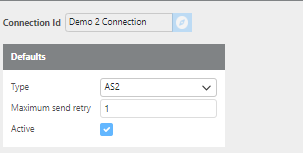
|
Field |
Description |
|
Connection Id |
A unique ID for this connection. |
|
Type |
The type of connection to use for communication. Options are AS2, FTP, and SFTP. |
|
Maximum send retry |
The number of times the system will attempt to resend a message if the initial send fails. |
|
Active |
Check this box if this connection is active. |
AS2
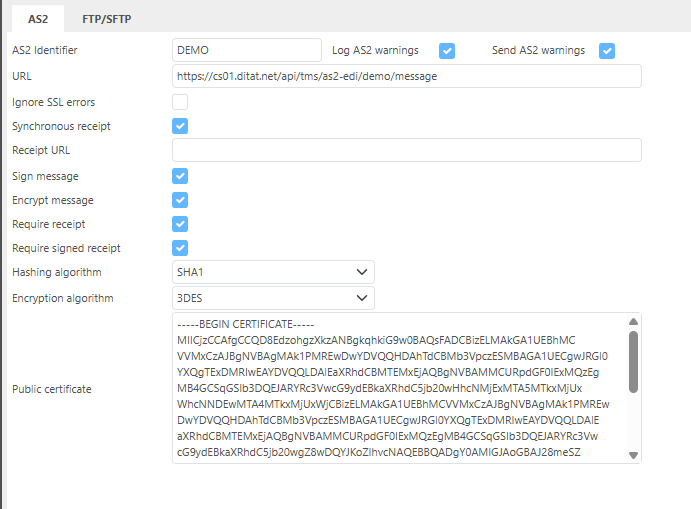
|
Field |
Description |
|
As2 Identifier |
The AS2 identifier for this connection. |
|
Log As2 warnings |
When checked, AS2 warnings will be logged. |
|
Send AS2 warnings |
When checked, AS2 warnings will be sent. |
|
URL |
The URL used to communicate with this connection. |
|
Ignore SSL Errors |
When checked, SSL errors will be ignored. |
|
Synchronous receipt |
Check this box to require a synchronous receipt. |
|
Receipt URL |
The URL used to receive receipts from this connection. Not normally needed. |
|
Sign message |
When checked, messages sent to this connection will be signed. |
|
Encrypt message |
When checked, messages sent to this connection will be encrypted. |
|
Require receipt |
When checked, a receipt is required from this connection. |
|
Require signed receipt |
When checked, a signed receipt is required from this connection. |
|
Hashing algorithm |
The hashing algorithm to use for this connection. |
|
Encryption algorithm |
The encryption algorithm to use for this connection. |
|
Public certificate |
The public certificate provided by this connection for encryption and verification purposes. |
Note: When receiving AS2 messages, the system ignores the URL and uses only the endpoint and AS2 ID to determine the message source. If an EDI partner uses the same AS2 ID for both testing and production environments, one will need to be changed to avoid conflicts.
FTP/SFTP
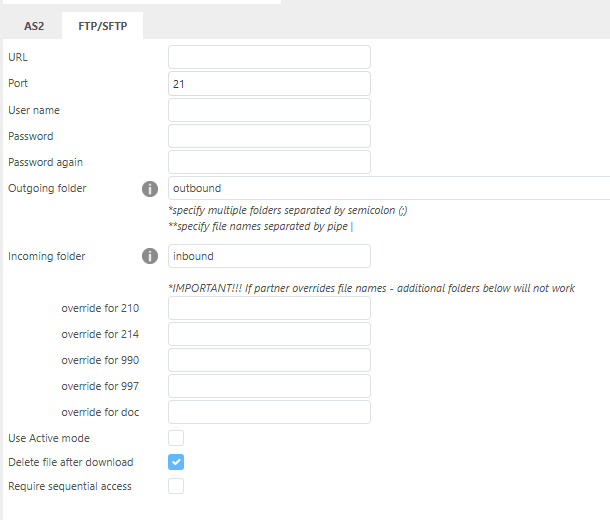
|
Field |
Description |
|
URL |
The URL for this FTP/SFTP site. |
|
Port |
The port to use for this connection. |
|
User name |
The username for this connection. |
|
Password |
The password for this connection. |
|
Password again |
Re-enter the password to confirm. |
|
Outgoing folder |
The folder path for outgoing messages to the EDI partner (e.g., |
|
Incoming folder |
The folder path for incoming messages from the EDI partner (e.g., |
|
override for 210 |
Enter custom file naming for 210 invoice files if required by this connection. |
|
override for 214 |
Enter custom file naming for 214 status files if required by this connection. |
|
override for 990 |
Enter custom file naming for 990 response files if required by this connection. |
|
override for 997 |
Enter custom file naming for 997 acknowledgment files if required by this connection. |
|
Directory parsing RegEx |
Used for FTP sites with lower security requirements. |
|
Use Active mode |
When checked, Active mode will be used for this FTP connection. |
|
Delete after download |
When checked, files will be deleted from the FTP site after they are downloaded. |
|
Require sequential access |
When checked, files will be uploaded in sequential order to the FTP/SFTP connection. |
FTP Root Folder: If the connection requires data to be uploaded or downloaded from the root folder, enter
/in the Incoming or Outgoing Folder field.
Troubleshooting Folder Paths: If you are experiencing connection issues, open the connection in FileZilla and copy the Remote Site path into the folder path field in the setup to verify the configuration is correct.
