
Navigation: Assets → Trucks
Click here for information on how to use a data entry window.
Truck ID and Status

|
Field |
Description |
|
Truck Id |
Can be up to 25 characters and must be unique within the system. If you enter an ID that already exists, that truck record will be loaded for editing. Otherwise, a new truck record will be created. |
|
Active |
Check this box to allow Ditat Mobile users to use this truck. |
|
Deactivated on |
If the truck is no longer active, enter the deactivation date manually or using the calendar tool. This field only appears when the truck is marked as inactive. |
|
Reason |
Select the reason the truck is no longer active. |
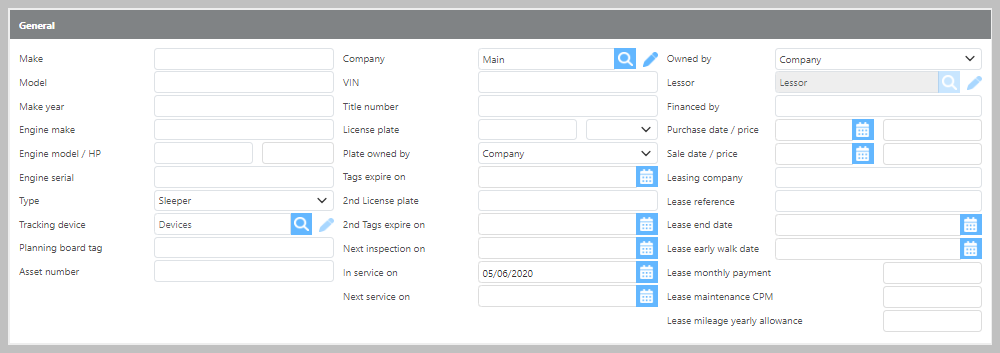
General
|
Field |
Description |
|
Make |
Enter the make of the truck. |
|
Model |
Enter the model of the truck. |
|
Make Year |
Enter the year the truck was manufactured. |
|
Engine make |
Enter the engine make. |
|
Engine model/ HP |
Enter the engine model and horsepower. |
|
Engine serial number |
Enter the engine serial number. |
|
Type |
Select the truck type. |
|
Tracking device |
Select the Ditat tracking device that will be used for this truck. |
|
Planning board tag |
Enter a tag that will display on the Planning Board alongside this truck. A driver name or identifier is recommended. |
|
Asset number |
Enter the asset number for this truck. |
|
Company |
Select which company this truck operates under. The primary company is selected by default when adding new trucks. |
|
VIN |
Enter the VIN for this truck. |
|
Title number |
Enter the title number. |
|
Plate owned by |
Select whether the plate is Company Owned or Contracted. |
|
License plate |
Enter the license plate number. |
|
Tags expire on |
Enter the tag expiration date. |
|
2nd License plate |
If the truck has a second license plate (such as a Mexico plate), enter it here. |
|
2nd Tags expire on |
Enter the expiration date for the second set of tags. |
|
Next inspection on |
Enter the date of the truck's next scheduled inspection. |
|
In service on |
Enter the date this truck entered service. |
|
Next service on |
Enter the date of the next scheduled service. This date can be used with the Truck Service dispatch rule. |
|
Owned by |
Select whether the truck is Company Owned or Contracted. |
|
Lessor |
If the truck is contracted, select the associated lessor. |
|
Financed by |
Enter the name of the financing company. |
|
Purchase date |
Enter the purchase date. |
|
Purchase price |
Enter the purchase price. |
|
Sale date |
Enter the sale date, if applicable. |
|
Sale price |
Enter the sale price, if applicable. |
|
Leasing company |
Enter the leasing company information. |
|
Lease reference |
Enter the reference information for this lease. |
|
Lease end date |
Enter the date the lease ends. |
|
Lease early walk date |
Enter the lease early walk date. |
|
Lease monthly payment |
Enter the monthly lease payment amount. |
|
Lease maintenance CPM |
Enter the lease maintenance cents-per-mile rate. |
|
Lease mileage yearly allowance |
Enter the yearly mileage allowance for this lease. |
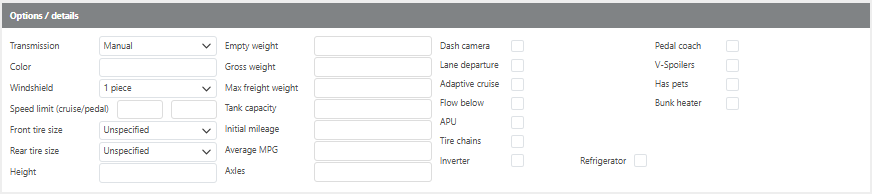
Truck Options
|
Field |
Description |
|
Transmission |
Select whether the truck has an Auto or Manual transmission. |
|
Color |
Enter the truck's color. |
|
Windshield |
Select whether the windshield is 1 Piece or 2 Piece. |
|
Speed limit (Cruise/Pedal) |
Enter the truck's speed limit setting. |
|
Front tire size |
Select the front tire size. |
|
Rear tire size |
Select the rear tire size. |
|
Height |
Enter the truck's height. |
|
Empty weight |
Enter the truck's empty weight. |
|
Gross weight |
Enter the truck's gross weight. |
|
Max freight weight |
Enter the maximum freight weight for this truck. |
|
Tank capacity |
Enter the fuel tank capacity. |
|
Initial mileage |
Enter the truck's mileage at the time it was added to the system. |
|
Average MPG |
Enter the truck's average miles per gallon. |
|
Axles |
Enter the number of axles. |
|
Dash camera |
Enter details about the dash camera, if equipped. |
|
Lane departure |
Check if this truck has lane departure warnings. |
|
Adaptive cruise |
Check if this truck has adaptive cruise control. |
|
Flow below |
Check if this truck has Flow Below. |
|
APU |
Check if this truck has an APU. Additional options will appear when this box is checked. |
|
Tire chains |
Check if this truck is equipped with tire chains. |
|
Inverter |
Check if this truck has an inverter. |
|
Refrigerator |
Check if this truck has a refrigerator. |
|
Pedal coach |
Check if this truck has Pedal Coach. Additional options will appear when this box is checked. |
|
V-Spoilers |
Check if this truck has V-Spoilers. |
|
Has pets |
Check if this truck is pet-friendly. |
|
Bunk heater |
Check if this truck has a bunk heater. |
References / Serials /Devices

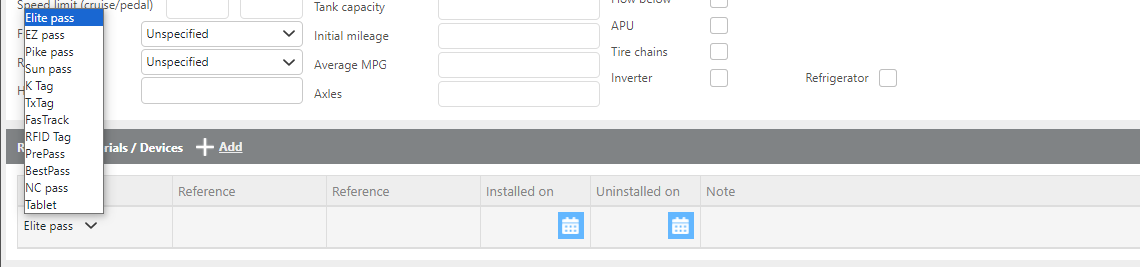
Click Add to add toll passes or other reference information to the truck. Use the drop-down to select the type of pass, then enter the associated reference details.
Insurance

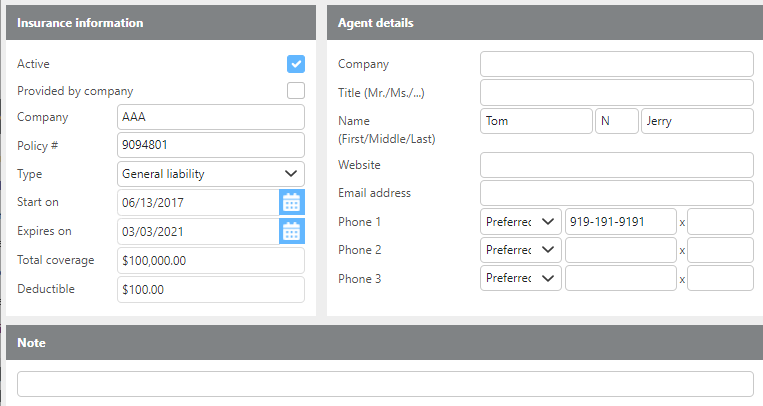
Click Add to enter insurance information for this truck. A window will open allowing you to add the policy details to the truck's file.
Custom groups

|
Field |
Description |
|
Groups |
Assign this truck to any applicable custom groups. Custom groups can be used for reporting and for filtering on the Planning and Dispatch boards. |