This report calculates pay for salary-based drivers using trip data, days worked, bonuses, and other adjustments for the selected date range.
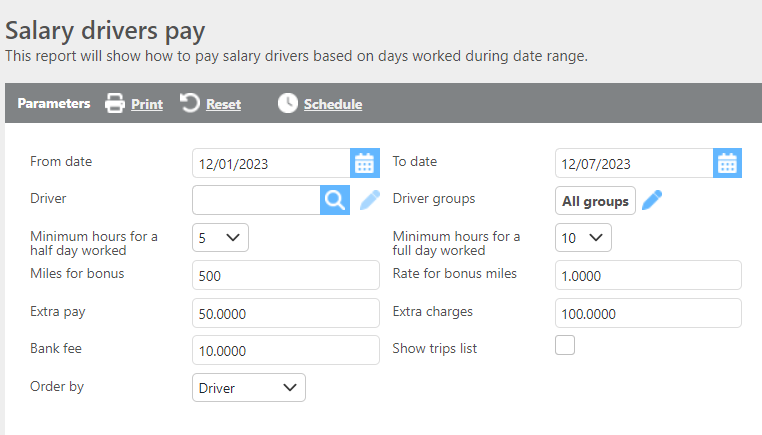
Report Parameters
|
Field |
Description |
|---|---|
|
From/To Date |
Enter the date range to filter trips by delivery date. If a trip picks up on 11/30 and delivers on 12/1, only the hours from 12/1 will be counted if 11/30 falls outside the date range. This date range is also used to calculate the number of days worked. |
|
Driver |
Select a specific driver to run the report for, or leave blank to include all drivers. |
|
Minimum hours for a half day worked |
Set the minimum number of hours required to count as a half day of work. |
|
Minimum hours for a full day worked |
Set the minimum number of hours required to count as a full day of work. |
|
Miles for bonus |
Enter a mileage threshold. Miles driven over this number will be used to calculate the driver's bonus. |
|
Rate for bonus miles |
Enter the rate per mile to use for the bonus calculation. This rate is multiplied by the number of miles driven over the miles for bonus threshold. |
|
Extra pay |
Enter an extra pay amount that will be added to all drivers' pay. |
|
Extra charges |
Enter an extra charge amount that will be subtracted from all drivers' pay. |
|
Bank fee |
Enter a bank fee amount that will be subtracted from all drivers' pay. |
|
Show trip list |
Check this box to display trip-level detail for the trips used in this calculation. |
|
Order by |
Select how the report should be ordered. |

Report Columns
|
Field |
Description |
|---|---|
|
Driver Id |
The driver's ID. |
|
Truck |
The truck ID assigned to the driver. |
|
Trip count |
The number of trips the driver completed within the date range. |
|
Total miles |
The total miles driven. Miles over the miles for bonus threshold are used to calculate the bonus. |
|
Days worked |
The number of days worked, calculated using the minimum hours set for half and full days in the parameters. |
|
Extra day count |
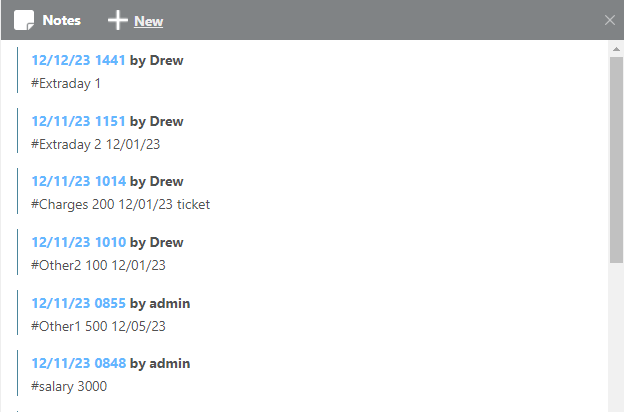
Additional days worked added via a hashtag in the driver profile's notes. The system looks for a date stamp on the note; if none is present, the date the note was added is used. Example: |
|
Fixed week rate |
The driver's salary rate, pulled from a hashtag in the driver profile's notes. The most recent salary hashtag will be used. Example: |
|
Days off |
Calculated as the total number of days in the date range minus the number of days worked. Example: A range of 12/01–12/07 is 7 days. 7 − 2.5 = 4.5 days off. |
|
Pay amount |
Calculated as the fixed week rate divided by the number of days in the date range, multiplied by the number of days worked. Example: |
|
Bank transfer |
Populated from the Bank Fee parameter. This amount is subtracted from the driver's pay amount. |
|
Bonus |
Calculated as the miles driven over the miles for bonus threshold multiplied by the rate for bonus miles. Example: |
|
Other 1 |
An additional pay amount pulled from a hashtag in the driver profile's notes. The system looks for a date stamp; if none is present, the date the note was added is used. Example: |
|
Other 2 |
A second additional pay amount pulled from a hashtag in the driver profile's notes. The system looks for a date stamp; if none is present, the date the note was added is used. Example: |
|
Extra pay |
Populated from the Extra Pay parameter. This amount is added to the driver's pay. |
|
Extra charges |
Populated from the Extra Charges parameter. This amount is subtracted from the driver's pay. |
|
Charges |
Individual driver charges pulled from a hashtag in the driver profile's notes. The system looks for a date stamp; if none is present, the date the note was added is used. Example: |
|
Driver pay |
The total calculated pay for the driver for the selected date range. Example: |
Hashtag Reference
Hashtags added to a driver profile's Notes section are used to populate salary and adjustment fields on this report. The following hashtags are supported:
|
Hashtag |
Description |
|---|---|
|
|
Sets the driver's fixed weekly rate. The most recent entry will be used. No date stamp required. |
|
|
Adds extra days worked for a specific date. |
|
|
Adds individual driver charges for a specific date. |
|
|
Adds an additional pay amount for a specific date. |
|
|
Adds a second additional pay amount for a specific date. |
Format examples:
-
#Salary 3000 -
#Extraday 2 12/01/23 -
#Charges 200 12/01/23 -
#Other1 500 12/05/23 -
#Other2 100 12/01/23
Note: For
#Salary, the most recent hashtag on the driver profile is always used. For#Extraday,#Charges,#Other1, and#Other2, the date included in the note determines which date range the entry applies to. If no date is included, the date the note was added to the profile will be used.