
This report displays a list of shipments with their invoice status and invoice details.
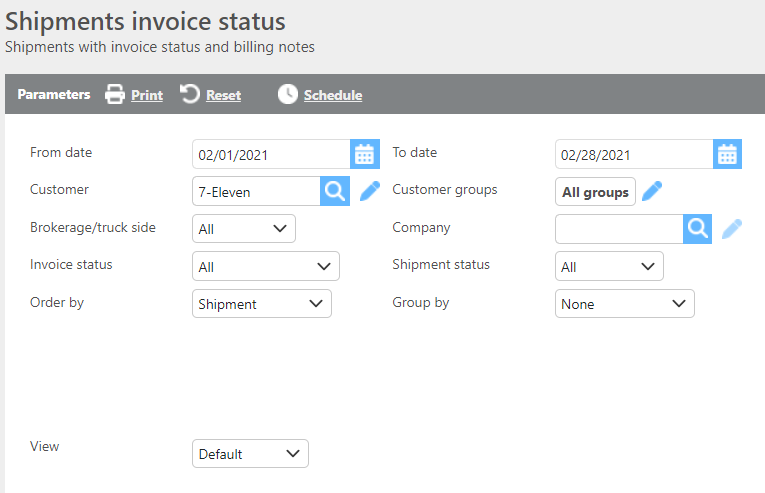
Report Parameters
|
Field |
Description |
|
From/To date |
Enter a date range to filter invoices. |
|
Customer |
If a customer is selected, only data for that customer will display. |
|
Customer groups |
If a customer group is selected, only data for that group will display. |
|
Brokerage/truck side |
Select which type of loads should be included in the report. |
|
Company |
If a company is selected, only data for that company will display. |
|
Invoice status |
Select the invoice status to filter results. |
|
Shipment status |
Select the shipment status to filter results. |
|
Order by |
Select how the data should be ordered on the report. |
|
Group by |
Select how the data should be grouped on the report. |
Report Columns
|
Field |
Description |
|
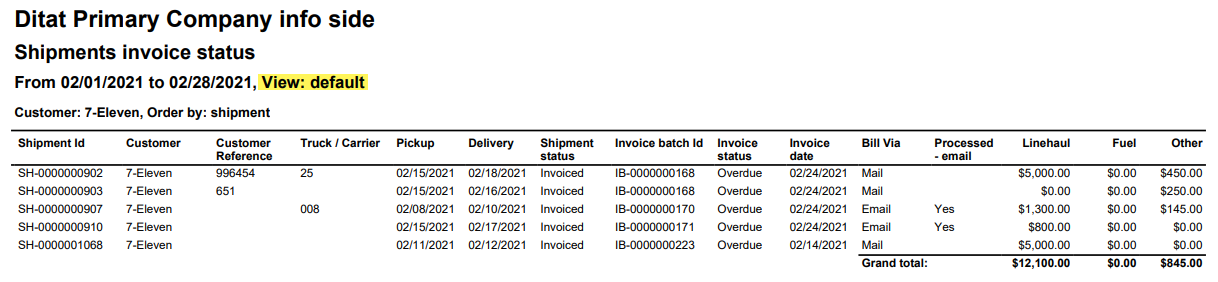
Shipment ID |
The shipment ID for the load. |
|
Truck/Carrier |
The truck or carrier ID from the load. |
|
Pickup |
The pickup date. |
|
Delivery |
The delivery date. |
|
Shipment status |
The current status of the shipment. |
|
Invoice batch Id |
The invoice batch the shipment was added to. |
|
Invoice status |
The invoice status based on whether it was marked as paid in your accounting software, referenced against the payment terms set on the customer. |
|
Billing notes |
The billing notes from the shipment, if any are added. |
|
Invoice date |
The invoice date. |
|
Bill via |
The billing method set on the customer. |
|
Processed - email |
Indicates whether the invoice was sent via email. |
|
Linehaul |
The linehaul charges on the invoice. |
|
Fuel |
The fuel charges on the invoice. |
|
Other |
Any additional charges not captured in the other columns. |
|
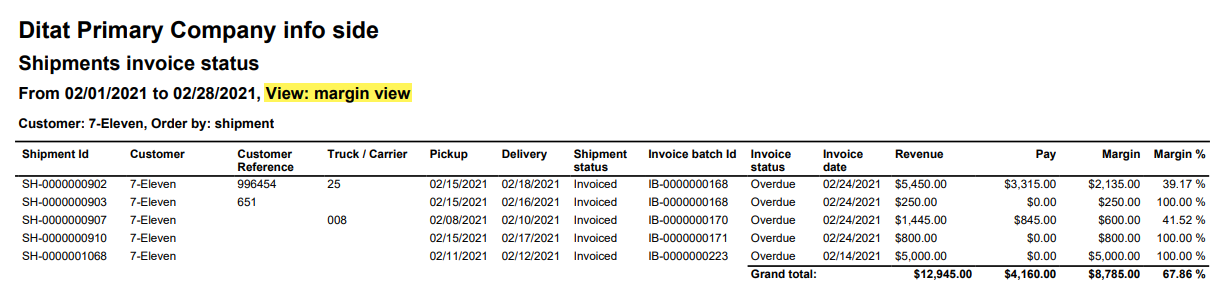
Revenue |
The total invoice revenue. |
|
Pay |
The trip pay from the invoiced load. |
|
Margin |
The margin on the invoiced load. |
|
Margin % |
The margin percentage on the invoiced load. |