
This report displays shipments that are ready to be invoiced.
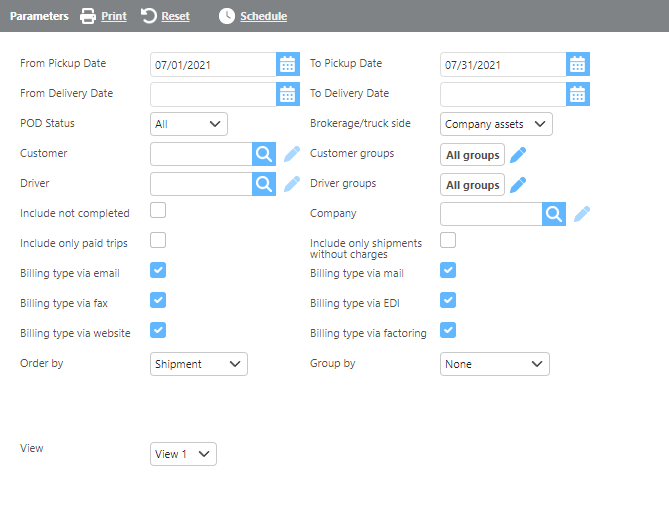
Report Parameters
|
Field |
Description |
|
From/To Pickup Date |
Enter a pickup date range to filter results to loads picking up within that range. |
|
From/To Delivery Date |
Enter a delivery date range to filter results to loads delivering within that range. |
|
POD Status |
Select whether to include only shipments with a POD, without a POD, or all shipments |
|
Brokerage/truck side |
Select whether to include only brokerage loads, company asset loads, or all load types. |
|
Customer |
If a customer is selected, only loads for that customer will display. |
|
Driver |
If a driver is selected, only loads for that driver will display. |
|
Groups |
If a custom group is selected, only data for that group will display. |
|
Include not completed |
Check this box to include incomplete loads in the report. |
|
Company |
If a company is selected, only loads for that company will display. |
|
Include only paid trips |
Check this box to include only loads with paid trips. |
|
Include only shipments without charges |
Check this box to include only shipments that have no charges entered. |
|
Billing type via email |
Check this box to include shipments set to be billed by email. |
|
Billing type via mail |
Check this box to include shipments set to be billed by mail. |
|
Billing type via fax |
Check this box to include shipments set to be billed by fax. |
|
Billing type via EDI |
Check this box to include shipments set to be billed by EDI. |
|
Billing type via website |
Check this box to include shipments set to be billed by website. |
|
Billing type via factoring |
Check this box to include shipments set to be billed by factoring. |
|
Order by |
Select how the data should be ordered on the report. |
|
Group by |
Select how the data should be grouped on the report. |
|
View |
Select which view to use. See view descriptions below. |
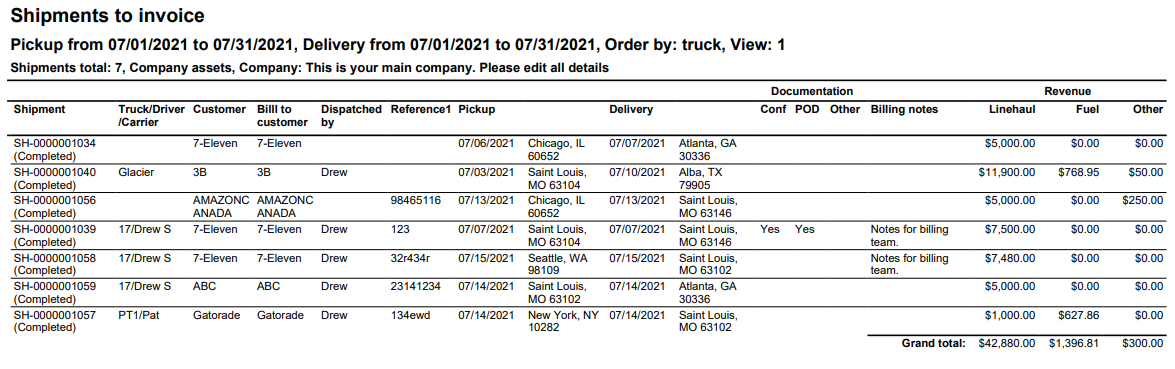
View 1
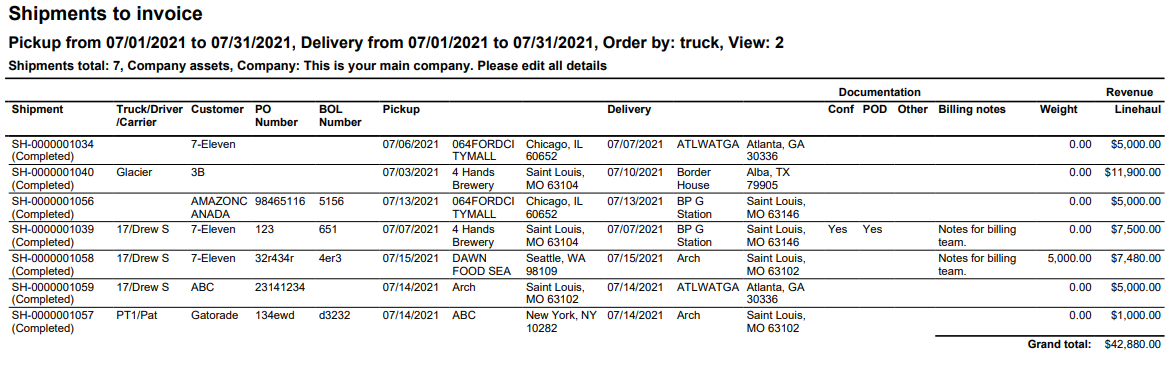
View 2
Report Columns
|
Field |
Description |
|
Shipment |
The shipment ID. |
|
Truck/Driver/Carrier |
The truck, driver, and/or carrier ID assigned to the load. |
|
Customer |
The customer ID. |
|
Bill to customer (View 1) |
The bill-to customer for the shipment. |
|
Dispatched by (View 1) |
The user that dispatched the trip, if applicable. |
|
Reference 1 (View 1) |
The first reference number from the shipment. |
|
PO Number Reference field 1 (View 2) |
The first reference number from the shipment, displayed with the field ID from the dispatch setup options. |
|
BOL Number Reference field 2 (View 2) |
The second reference number from the shipment, displayed with the field ID from the dispatch setup options. |
|
Pickup |
The pickup date, location ID, and address. |
|
Delivery |
The delivery date, location ID, and address. |
|
Documentation |
Indicates whether a confirmation sheet, POD, and/or other documentation has been added to document management for the shipment. |
|
Billing notes |
Billing notes from the shipment. |
|
Weight (View 2) |
The weight entered on the shipment. |
|
Linehaul |
The linehaul charges on the shipment. |
|
Fuel (View 1) |
The fuel charges on the shipment. |
|
Other (View 1) |
Any other charges on the shipment. |