
This report displays a margin summary of all loads by truck.
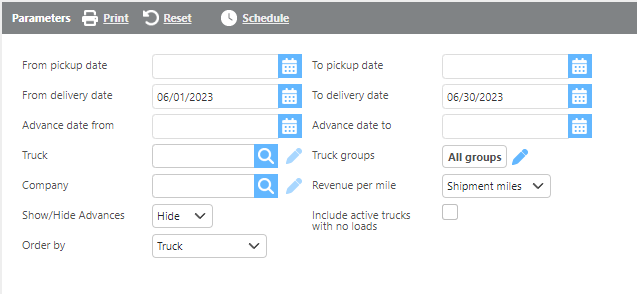
Report Parameters
|
Field |
Description |
|
From/To pickup date |
Enter a pickup date range to filter results. |
|
From/To delivery date |
Enter a delivery date range to filter results. |
|
From/to Advance date |
Enter an advance date range to filter results. |
|
Truck |
Select a specific truck to filter results. |
|
Truck Groups |
Select one or more truck groups to filter results. |
|
Company |
Select a company to include only trucks running for that company. |
|
Revenue per mile |
Select how revenue per mile should be calculated: by Shipment Miles, Loaded Miles, or Total Miles. |
|
Include active trucks with no loads |
Check this option to include active trucks with no assigned loads in the report. |
|
Order by |
Select how the results should be ordered. |
Note: The Fuel, Tolls, and Other Advances columns will only be populated if an advance date range is selected in the report parameters. For advances to display, the truck must be linked on the advance and the Truck checkbox must be checked on the advance.

|
Field |
Description |
|
Truck |
The truck ID. |
|
Trip count |
The number of trips for the truck during the date range. |
|
Empty miles |
The total empty miles for the truck. |
|
Loaded miles |
The total loaded miles for the truck. |
|
Total miles |
The total miles for the truck. |
|
Linehaul revenue |
The total linehaul revenue for the truck. |
|
Total revenue |
The total revenue for the truck. |
|
Revenue per mile |
The revenue per mile for the truck based on the selected calculation method. |
|
Total pay |
The total driver or carrier pay for the truck. |
|
Fuel |
The total fuel advances linked to the truck, including DEF. |
|
Tolls |
The total toll advances linked to the truck. |
|
Other Advances |
The total of all other advances linked to the truck. |
|
Truck Payments |
The truck lease payment amount, calculated as: Lease Monthly Payment ÷ days in month × days included in the date range. This value is pulled from the Lease Monthly Payment field on the truck profile. |
|
Other Fixed Costs |
Additional fixed costs pulled from the truck profile's Notes section. The most recent note beginning with |
|
Reimbursements |
The total reimbursements linked to the truck for the date range. |
|
Margin |
The final calculated margin for the truck. |
Margin Formula
Margin is calculated as follows:
Margin = Total Revenue − Total Pay − Fuel − Tolls − Other Advances − Truck Payments − Other Fixed Costs − Reimbursements + Applied Advances