
Navigation: Maintenance → Maintain Work Order
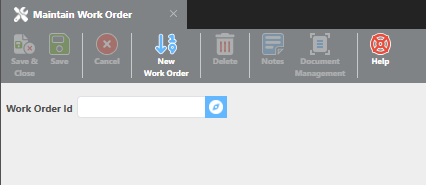
Work Order ID
Work Order IDs can be up to 25 characters and must be unique within the system. If you enter an ID that already exists, that work order will be loaded for editing. To create a new work order, click New Work Order — the system will automatically assign a Work Order ID once the record is saved.
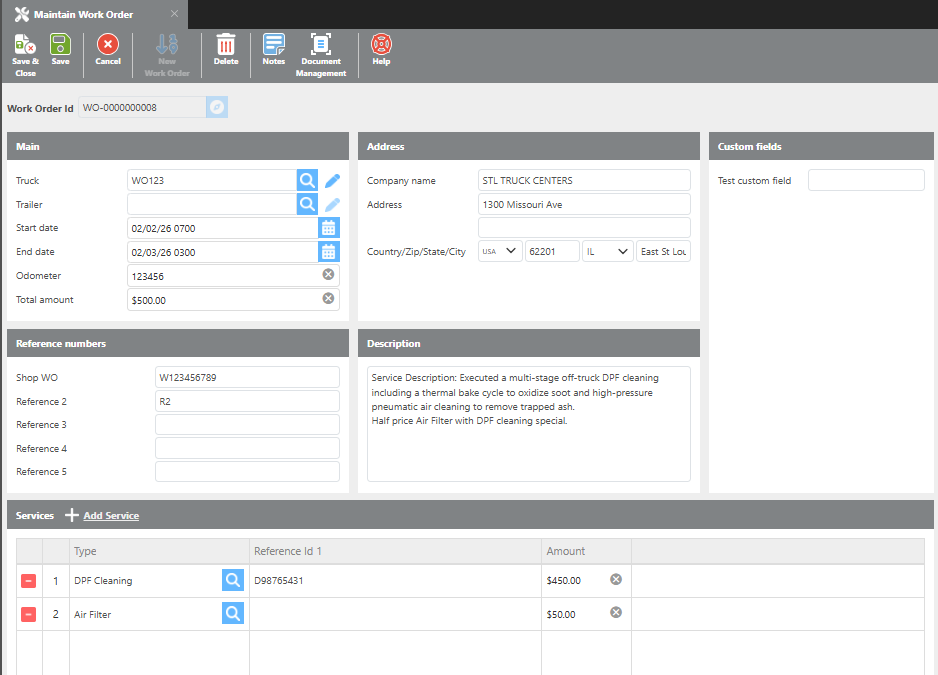
|
Field |
Description |
|---|---|
|
Truck |
Select the truck associated with this work order. |
|
Trailer |
Select the trailer associated with this work order. |
|
Start Date |
Enter the date the service began. |
|
End Date |
Enter the date the service ended. |
|
Odometer |
Enter the odometer reading at the time of service. |
|
Total Amount |
Enter the total cost of the service. This amount must equal the sum of all individual service line items. |
Address
Enter the facility name and address where the service was performed. At minimum, Country, Zip, State, and City are required.
Custom Fields
Up to 15 custom fields can be configured per account. These fields are account-specific and cannot be used in standard Ditat reports. For help adding or editing custom fields, contact support at support@ditat.com.
Reference Numbers
Enter any reference numbers for this work order. The labels for all five reference fields can be customized in the Maintenance Setup Options screen.
Description
Enter a description for this work order.
Services
Click + Add Service to add individual service line items to the work order.
|
Field |
Description |
|---|---|
|
Type |
Select the service type. |
|
Reference ID 1 |
Enter the service reference detail. |
|
Amount |
Enter the cost for this service item. |