
Navigation: Maintenance → Set Up Service Types
Use this screen to create service type options that can be assigned to maintenance plans.
Note: The Days and Distance values entered here will be used as defaults when the service type is assigned to a maintenance plan.
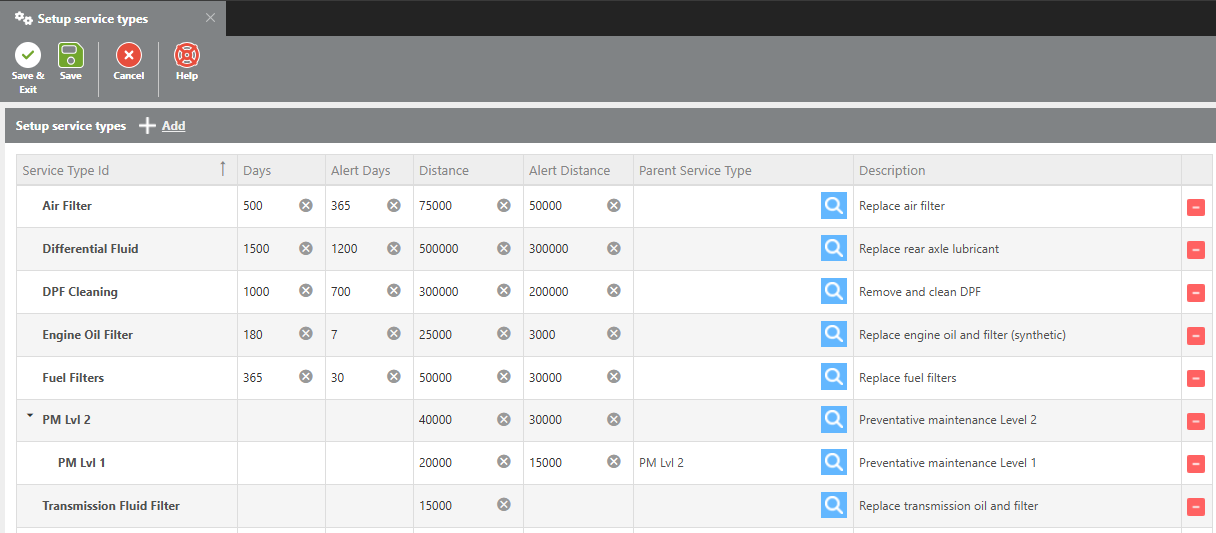
Service Type Fields
|
Field |
Description |
|---|---|
|
Service Type ID |
Enter a unique ID for this service type. |
|
Days |
Enter the number of days between each scheduled service. |
|
Alert Days |
Enter the number of days before the service is due to trigger an alert. |
|
Distance |
Enter the number of miles between each scheduled service. |
|
Alert Distance |
Enter the number of miles before the service is due to trigger an alert. |
|
Parent Service Type |
If a parent service type is assigned, completing the parent service will be understood as covering all linked child services as well. |
|
Description |
Enter a description for this service type. |
Example – Days: A 365-day service interval with an Alert Days value of 30 will send an alert 30 days before the service is due.
Example – Distance: A 20,000-mile service interval with an Alert Distance value of 3,000 will send an alert when the asset is 3,000 miles from the next service.
Example – Parent Service Type: If PM Level 1 and PM Level 2 are set up with Level 1 as the parent of Level 2, completing a PM Level 1 covers only Level 1. Completing a PM Level 2 covers both Level 1 and Level 2.