
Navigation: Maintenance → Set Up Maintenance Plans
Use this screen to create maintenance plans and link the assets that should follow each plan.
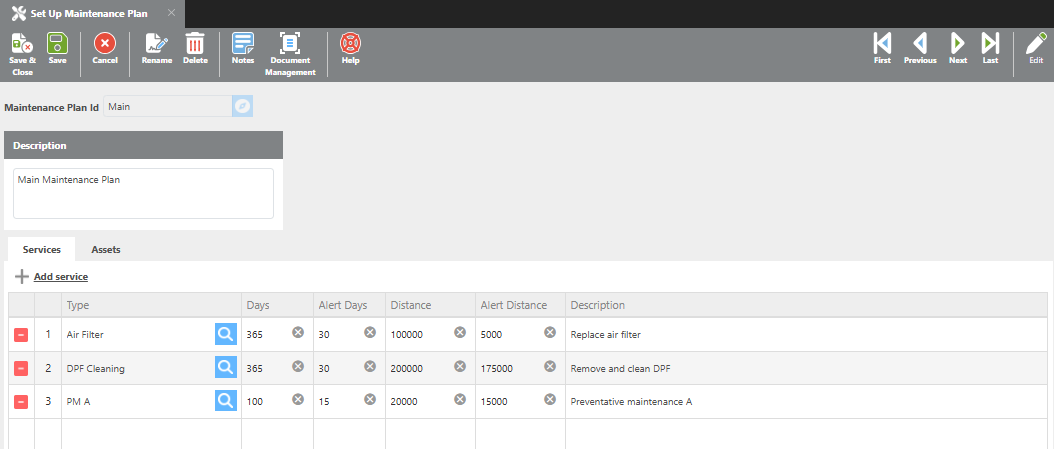
Description
Enter a description for this maintenance plan.
Services
Click + Add Service to add service lines to the plan. Each service line can track intervals by days, miles, or both.
|
Field |
Description |
|---|---|
|
Type |
Select the service type to be tracked on this plan. |
|
Days |
Enter the number of days between each scheduled service. |
|
Alert days |
Enter the number of days before the service is due to trigger an alert. |
|
Distance |
Enter the number of miles between each scheduled service. |
|
Alert Distance |
Enter the number of miles before the service is due to trigger an alert. |
|
Description |
Enter a description for this service line. |
If ELD miles are available, they will be used; then TMS miles, then truck recorded miles.
Example – Days: A 365-day service interval with an Alert Days value of 30 will send an alert 30 days before the service is due.
Example – Distance: A 20,000-mile service interval with an Alert Distance value of 3,000 will send an alert when the asset is 3,000 miles away from the next service.
The following icons are available on each service line:
-
The delete icon removes the service line from the plan.
-
The count icon displays the current service count for that line.
Assets
Click + Add Asset to link an asset to this maintenance plan.
|
Field |
Description |
|---|---|
|
Truck |
Select the truck to assign to this plan. |
|
Trailer |
Select the trailer to assign to this plan. |
|
Current On |
Enter the date this asset was last serviced. |
The remove icon will unlink the asset from the plan without deleting it from the system.