
To access: Mobile → Set Up Options
Click here for information on how to use a data entry window.
Set Up Mobile Options
Mobile Options control how the Ditat TMS integrates with mobile devices.
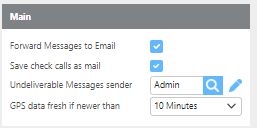
|
Field |
Description |
|
Forward Messages to Email |
When checked, messages sent from drivers will also be delivered as mail within the TMS. |
|
Save check calls as mail |
When checked, check calls submitted by drivers will also be saved as mail within the TMS. |
|
Undeliverable Messages sender |
The default recipient for messages sent to invalid or unrecognized recipients. This prevents messages from being lost if an incorrect recipient is entered. |
|
GPS data fresh if newer than |
Sets the time threshold for considering GPS data current. Options are 10 minutes, 30 minutes, or 1 hour. |
|
Field |
Description |
|
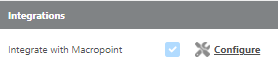
Integrate with Macropoint |
This integration must be enabled by Ditat. For details or pricing, contact support@ditat.com. Once enabled, click Configure to complete the integration setup. |