
EDI Appointment
This report will show the EDI partner, the shipment, and the reference number with when the load tender was accepted and received. This will show the appointment date and the submitted check call time.
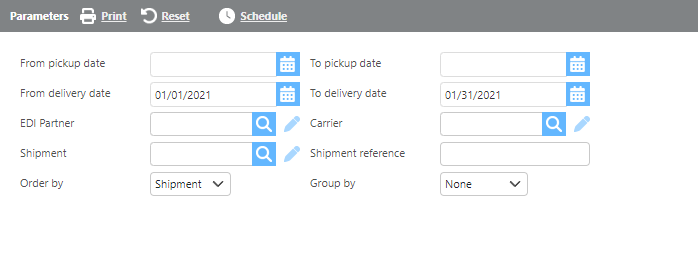
EDI Appointment Parameters
Report Parameters
Field | Description |
From/To pickup date | Select a pickup date range to filter results. |
From/To delivery date | Select a delivery date range to filter results. |
EDI Partner | Select a specific EDI partner to filter results or leave blank to include all. |
Carrier | Select a specific carrier to filter results, or leave blank to include all. |
Shipment | Enter a specific shipment number to filter results. |
Shipment reference | Enter a shipment reference number to filter results. |
Group by | Select how you would like the results grouped. |
Order by | Select how you would like the results ordered. |
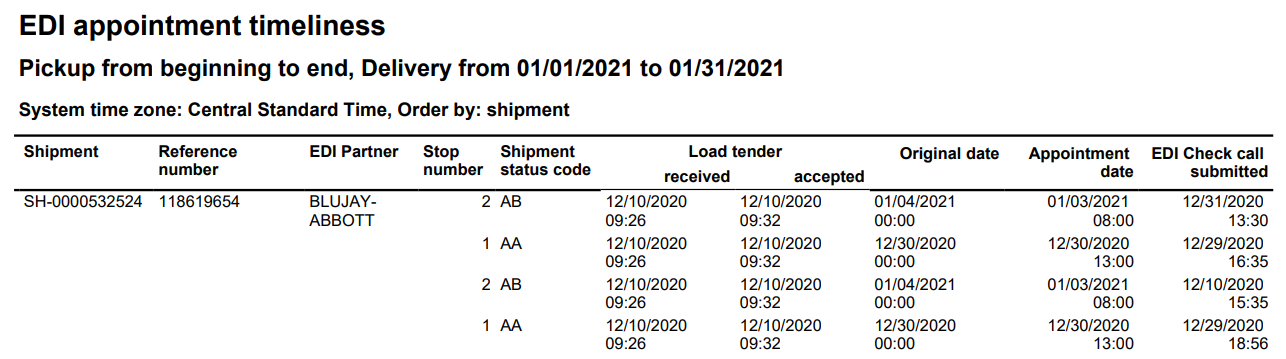
EDI Appointment Timeliness Results
Report Columns
Field | Description |
Shipment | The shipment number. |
Reference number | The reference number from reference field one. |
EDI partner | The name of the EDI partner. |
Stop number | The specific stop number associated with the data. |
Shipment status code | The shipment status code. |
Load tender | The timestamps for when the load tender was received and accepted. |
Original date | The original date recorded for the shipment. |
Appointment date | The scheduled appointment date. |
EDI Check call submitted | The timestamp for when the check call was submitted. |