
This report will show a breakdown of miles per state by truck, or by truck per state.
IFTA Data
IFTA Data is only stored for the last 4 Quarters. Reports should be saved to use yearly calculations, as you will not be able to run reports in Ditat for more than 4 quarters in the past.
ELD Miles
Miles are pulled from Samsara once a month, starting on the 4th day of a month, if the miles are not available the system will continue to try and pull the miles until they are collected. Miles are collected per truck, per state, per month.
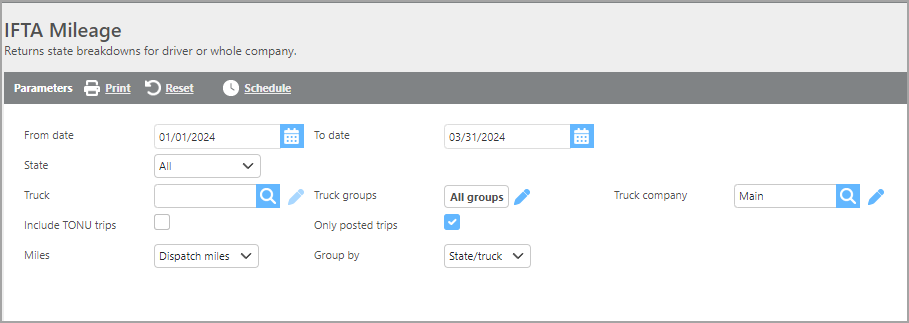
Report Parameters
|
Field |
Description |
|
From/To date |
Enter a date range to run the report. |
|
State |
Select a state to display only miles for that state. |
|
Truck |
Select a truck to display data only for that truck. |
|
Truck company |
If a company is selected, only data for that company will be displayed. |
|
Truck groups |
If a group is selected, only miles for that truck group will display. |
|
Include TONU trips |
Check this box if TONU trips should be included. |
|
Only posted trips |
Check this box if only posted trips should display. |
|
Miles |
Choose whether you want to run the report for Dispatch (trip) miles or ELD miles (Samsara integration required). |
|
Group by |
Select how this report should be grouped. |
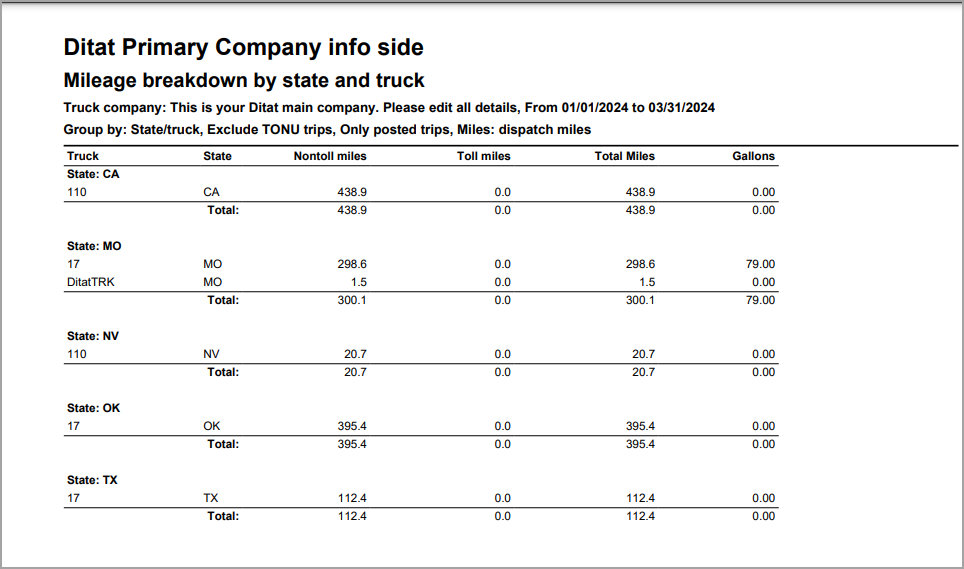
Report Columns
|
Field |
Description |
|
Truck |
Truck ID |
|
State |
State abbreviation |
|
Non toll miles |
This field will display miles that are non-toll. |
|
Toll miles |
This field will display toll miles only. |
|
Total miles |
This field will display the total miles. |
|
Gallons |
This field will display the gallons. |