
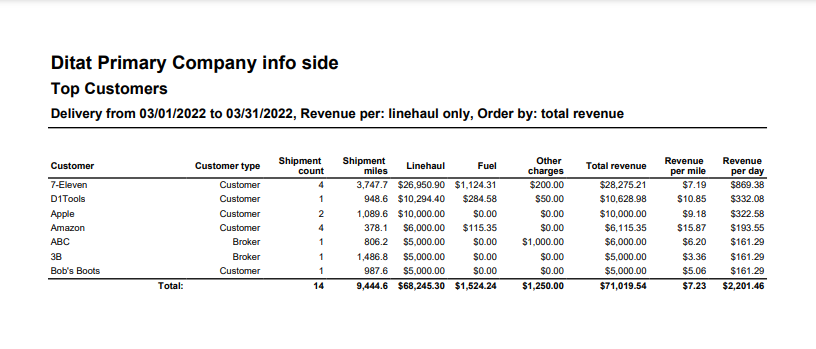
This report displays customers with their shipment count, miles, and revenue for the selected date range.
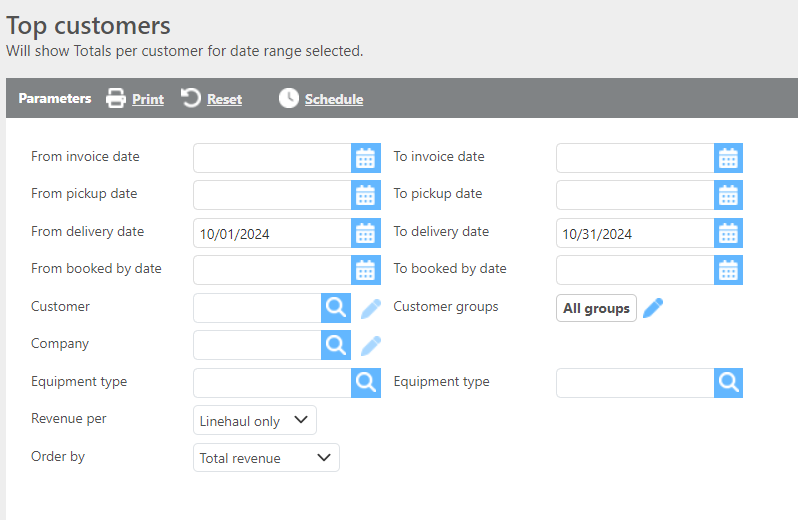
Report Parameters
|
Field |
Description |
|
From/To invoice date |
Enter an invoice date range to filter results. |
|
From/To pick up date |
Enter a pickup date range to filter results. |
|
From/To delivery date |
Enter a delivery date range to filter results. |
|
From/To booked by date |
Enter a booked by date range to filter results. This field looks at the created date of loads |
|
Customer |
If a customer is selected, only data for that customer will display. |
|
Customer groups |
If a customer group is selected, only data for that group will display. |
|
Company |
If a company is selected, only data for that company will display. |
|
Order by |
Select how the data should be ordered on the report. |
Report Columns
|
Field |
Description |
|
Customer |
The customer ID. |
|
Customer type |
The customer type. |
|
Shipment count |
The number of shipments for the selected date range. |
|
Shipment miles |
The total shipment miles for the selected date range. |
|
Linehaul |
The total linehaul charges for the selected date range. |
|
Fuel |
The total fuel charges for the selected date range. |
|
Other charges |
The total of all other charges for the selected date range. |
|
Total revenue |
The total revenue for the selected date range. |
|
Revenue per mile |
The revenue per mile for the selected date range. |
|
Revenue per day |
The revenue per day for the selected date range. |