

This report will show the actions made when auto paying a trip.
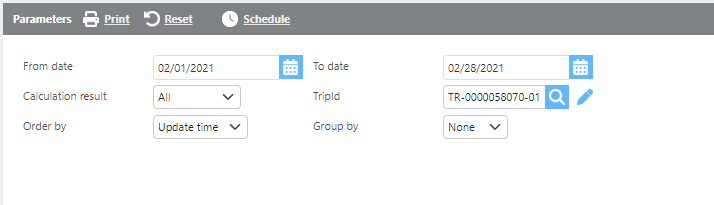
|
Field |
Description |
|
From/To date |
Here enter a date range for data to display on the report. |
|
Trip Id |
Here select a specific trip to run this report for. |
|
Group by |
Here select how the data should be grouped on this report. |
|
Order by |
Here select how data should be ordered on this report. |

|
Field |
Description |
|
Trip Id |
This field will display the trip Id. |
|
Origin |
This field will display the origin city, state, zip code, and date. |
|
Destination |
This field will display the destination city, state, zip code, and date. |
|
Calculation result |
This field will display if there was an update or no change. |
|
Notes |
This field will display the auto pay notes added to the shipment. |
|
Total amount |
This field will display the total pay amount. |
|
Payment type |
This field will display the payment type used. |
|
Quantity |
This field will display the quantity used. |
|
Rate |
This field will display the rate used. |
|
Charge |
This field will display the total charge for each line. |