
This report displays the most recent trip for each driver or carrier along with trip details and the time elapsed since the trip was completed.
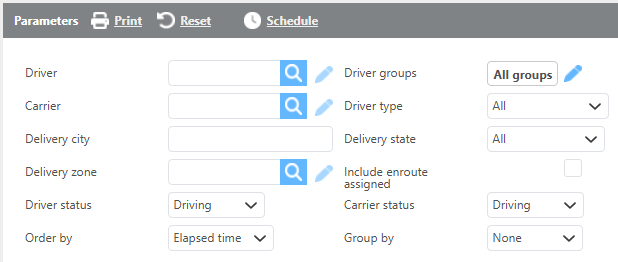
Report Parameters
|
Field |
Description |
|
Driver |
Select a specific driver to filter results to that driver only. |
|
Carrier |
Select a specific carrier to filter results to that carrier only. |
|
Groups |
Select a custom group to limit results to drivers or carriers within that group. |
|
Delivery city |
Enter a delivery city to include only trips with that delivery city. |
|
Delivery state |
Select a delivery state to include only trips with that delivery state. |
|
Delivery zone |
Select a delivery zone to include only trips within that delivery zone. |
|
Include enroute assigned |
Check this box to include loads that are currently enroute or assigned. |
|
Driver status |
Select a driver status to include only drivers in that status. |
|
Carrier status |
Select a carrier status to include only carriers in that status. |
|
Order by |
Select how the data should be ordered on the report. |
|
Group by |
Select if and how the data should be grouped on the report. |

Report Parameters
|
Field |
Description |
|
Driver (Carrier) Name |
The driver's or carrier's name. |
|
Phone number |
The driver's or carrier's phone number. |
|
Truck |
The truck number assigned to the trip. |
|
Trip |
The trip number. |
|
From |
The city, state, and zip code of the pickup location. |
|
To |
The city, state, and zip code of the delivery location. |
|
Pickup |
The pickup check call time. |
|
Delivery |
The delivery check call time. |
|
Elapsed time |
The time elapsed since the trip was completed. |