
This report will show a list of drivers who had safety events during the date range with details from the safety event.
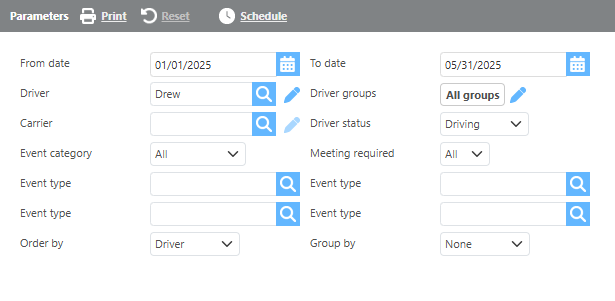
Report Parameters
|
Field |
Description |
|
From/To date |
Enter a date range for data to display on the report. |
|
Driver |
Select a driver and only events for that driver will be displayed. |
|
Carrier |
Select a carrier and only events for that carrier will be displayed. |
|
Groups |
Select a custom group and only events for that grou will be displayed. |
|
Driver status |
Select a driver status and only events for that status will be displayed. |
|
Meeting required |
Select if safety events requiring a meeting, not requiring a meeting, or both should be displayed on this report. |
|
Safety event type |
Select specific safety event types to see results for. These may be combined. |
|
Order by |
Select from the drop-down how you would like the safety events ordered on the report. |
|
Group by |
Select from the drop-down if/how you would like the report grouped. |
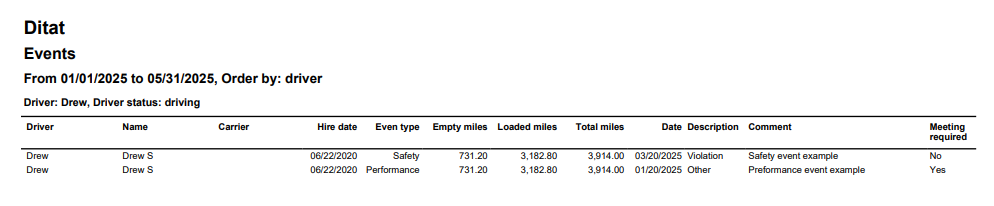
Report Columns
|
Field |
Description |
|
Driver |
The driver's ID. |
|
Name |
The driver's name. |
|
Carrier |
This field will display the carrier associated with the driver if applicable. |
|
Hire date |
The date the driver was hired. |
|
Empty miles |
The driver's empty miles for the date range. |
|
Loaded miles |
The driver's loaded miles for the date range. |
|
Total miles |
The driver's total miles for the date range. |
|
Date |
The date the safety event occurred. |
|
Description |
The description for the safety event. |
|
Comment |
This field will display any comments for the safety event. |
|
Meeting required |
This field will display if a meeting is required for the safety event. |