
Navigation: Assets → Mechanic
Click here for information on how to use a data entry window.
Anyone who tries to use Ditat Mobile Dispatch must be setup as either a Driver or a Mechanic.
Mechanic Fields
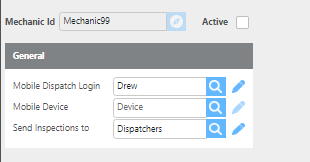
|
Field |
Description |
|
Mechanic Id |
Can be up to 25 characters and must be unique within the system. If you enter an ID that already exists, that mechanic record will be loaded for editing. Otherwise, a new mechanic record will be created. |
|
Active |
Check this box to allow the mechanic to log in to Ditat Mobile Dispatch. If unchecked, the mechanic will not be able to log in. |
|
Mobile Dispatch Login |
Select or enter the user account this mechanic will use to log in to the mobile app. The user must be set up in advance with mobile device access. Click here for information on setting up users. |
|
Mobile Device |
Select or enter the ID of the device this mechanic will use. The device must be added to the system in advance. Click here for information on setting up devices. |
|
Send Inspections to |
Select or enter the group that this mechanic's inspections should be sent to. |