
To access: System → Schedules
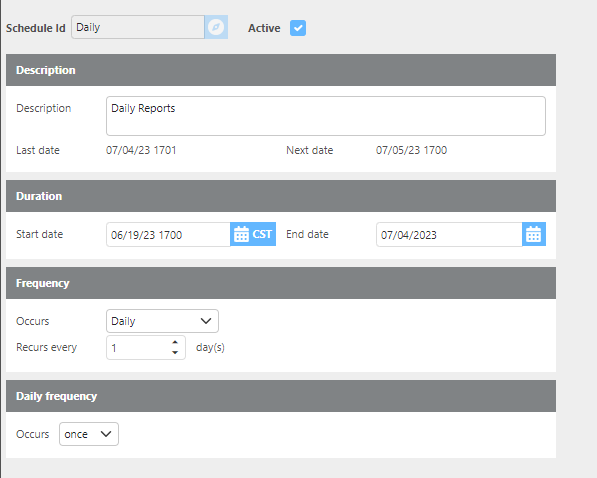
Use this screen to create schedules that can be assigned when setting up automated report delivery.
|
Field |
Description |
|
Schedule Id |
A unique ID of up to 25 characters. If an existing ID is entered, that record will be retrieved for editing. If the ID does not exist, a new schedule record will be created. Choose an ID that will be clearly descriptive when selecting this schedule on a report. |
|
Description |
A description of the schedule. Use this to help your team easily identify the schedule's purpose when setting up reports. |
|
Duration |
The date range during which the schedule is active. Requires a start date and an end date. |
|
Frequency |
How often the schedule runs. Options are Daily, Weekly, Monthly, or Monthly Relative. The selection made here will update the next field to allow you to specify additional timing details. |
|
Daily Frequency |
Specifies whether the task should run once per day or repeat at a set interval (e.g., every 2 hours). This is useful for recurring reports, such as sending status updates to customers on all active loads throughout the day. |
The daily frequency is there so you can schedule a report to run every 2 hours, for example. This can be used for sending customer updates on all active loads.