
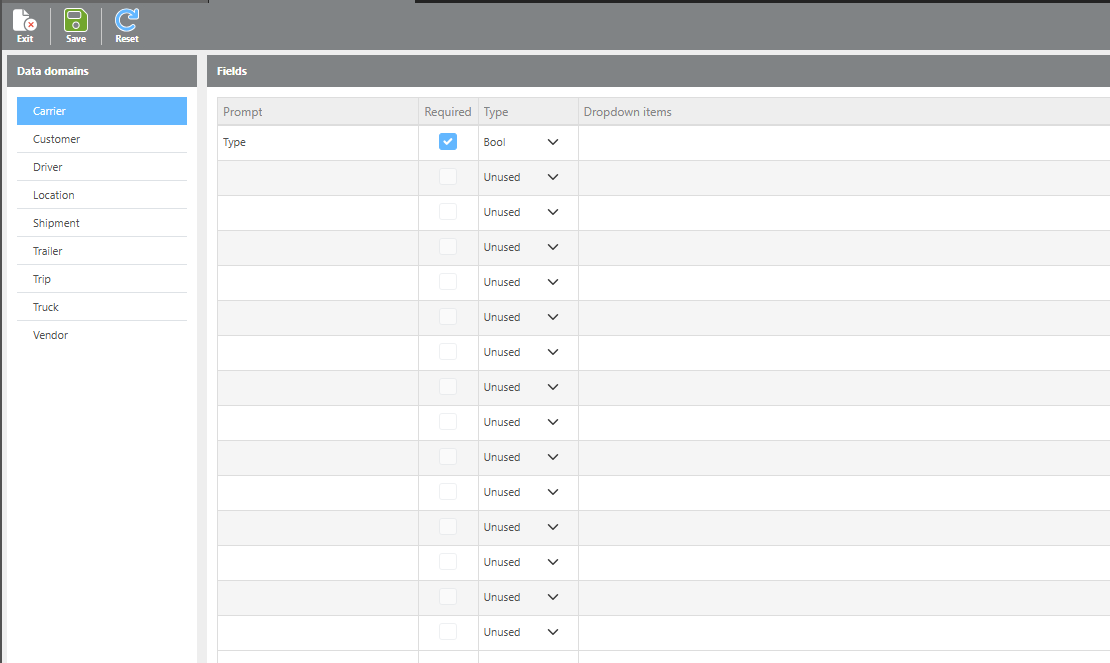
Custom fields can be configured to store additional data across various record types. These fields are specific to your account and support multiple data types, allowing for flexible and detailed information capture. Custom fields are intended for record-keeping and reporting purposes only and do not affect system functionality.
|
Field |
Description |
|
Data Domains |
The list of record types that support custom fields. Select a data domain on the left to view and manage the custom fields available for that record type on the right. |
|
Prompt |
The label or name of the custom field as it will appear on the record. A field type must be selected before a prompt can be added. |
|
Required |
When checked, this field will be required on all records of the selected data domain. |
|
Type |
The data type for the field. Options are: Bool (Yes/No checkbox), Integer (whole number), Decimal (number with decimal places), Currency (dollar amount), String (open text box), Date (date entry), DateTime (date and time entry), Dropdown (a selectable list of options). |
|
Dropdown items |
If Dropdown is selected as the field type, use this field to define the list of options that will appear in the dropdown menu. |
Important Notes
⚠ Changing a custom field type after data has been entered is not recommended. If the field type is changed to one that is incompatible with previously saved data, that data will be permanently removed from the database. For example, changing a DateTime field to a Bool (Yes/No) field will delete all date/time values previously saved in that field.