
Note: All integrations must be enabled by Ditat before use. For details and pricing, contact sales@ditat.com.
SkyBitz

|
Field |
Description |
|
Account Id |
Enter a name to identify this account. |
|
API URL |
Enter the API URL and port. |
|
User name |
Enter your SkyBitz username. |
|
Password |
Enter your SkyBitz password. |
|
Active |
Check this box to mark this account as active. |
|
GPS refresh on |
Displays the date and time of the last GPS refresh. |
|
Data trim on |
Displays the date and time of the last data trim. |
GPS Tracking
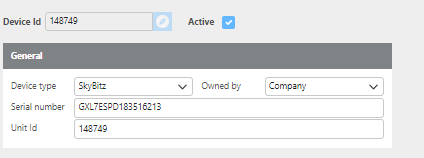
For GPS tracking, Ditat matches the SkyBitz Asset ID to the Unit ID on the Maintain Device screen.
(Image: Device setup example for SkyBitz tracking)
To begin tracking a trailer using SkyBitz, add the corresponding device to the trailer's profile in the Tracking Device field.
Error Codes
Error Code 9 If you receive the message "Sync GPS data failed, SkyBitz web service returned error code: 9," this indicates that the SkyBitz user account does not have the correct privileges. Contact SkyBitz support at customercare.skybitz@ametek.com for assistance.
Error Code 97 If you receive the message "Sync GPS data failed, SkyBitz web service returned error code: 97," this indicates that the XML interface command queue is full. This occurs when too many commands are sent and the watchdog blocks additional requests to prevent attacks. Contact SkyBitz support at customercare.skybitz@ametek.com for assistance.