
Note: All integrations must be enabled by Ditat before use. For details and pricing, contact sales@ditat.com.
Blue Tree (Orbcomm)
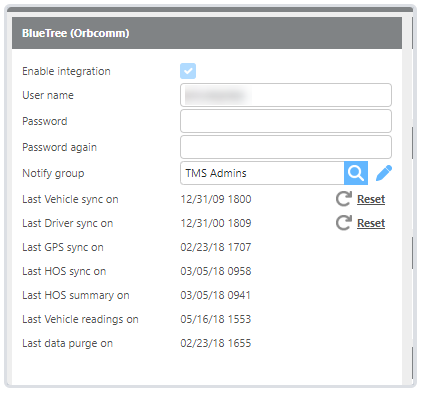
|
Field |
Description |
|
Enable integration |
Must be enabled by Ditat. Contact sales@ditat.com for details. |
|
Last data purge on |
Select the group that will be notified if an error occurs. |
|
Last Driver sync on |
Displays the date of the last driver sync. Click Reset to re-sync. |
|
Last GPS sync on |
Displays the date of the last GPS sync. |
|
Last HOS summary on |
Displays the date of the last HOS summary. |
|
Last HOS sync on |
Displays the date of the last HOS sync. |
|
Last Vehicle sync on |
Displays the date of the last vehicle sync. Click Reset to re-sync. |
|
Notify group |
Select the group that will be notified if an error occurs. |
|
Password |
Enter your Blue Tree username. |
|
Username |
Enter your Blue Tree password. |
Blue Tree Reefer Alerts
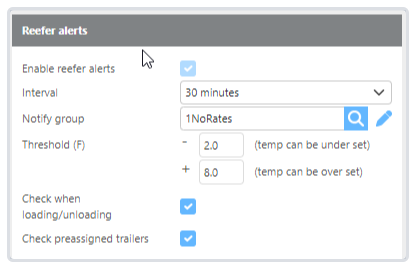
|
Field |
Description |
|
Enable reefer alerts |
Must be enabled by Ditat. Contact sales@ditat.com for details. |
|
Interval |
Select how frequently alerts should be checked and sent. |
|
Notify group |
Select the group that will receive email notifications about any reefer issues. |
|
Threshold |
Select the acceptable temperature range around the specified target temperature. |
|
Check when loading/unloading |
Check this box to monitor temperature during the loading and unloading process. |
|
Check preassigned trailers |
Check this box to monitor temperature for pre-assigned trailers. |
GPS Tracking
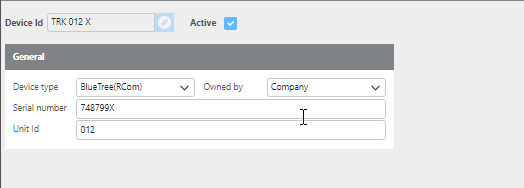
For GPS tracking, Ditat matches the Blue Tree Asset ID to the Unit ID on the Maintain Device screen.
(Image: Device setup example for Blue Tree tracking)
To begin tracking a truck using Blue Tree, add the corresponding device to the truck's profile in the Tracking Device field.
Sync Driver HOS
To integrate HOS data with Blue Tree, the Ditat Driver ID must match the Blue Tree Driver Company ID.
Click here for more information about HOS.