
Note: All integrations must be enabled by Ditat before use. For details and pricing, contact sales@ditat.com.
Zonar
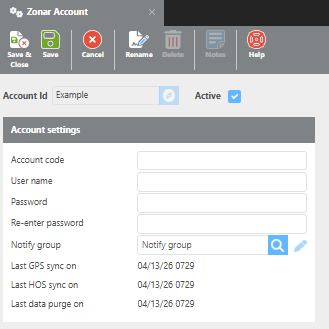
|
Field |
Description |
|
Enable integration |
Must be enabled by Ditat. Contact sales@ditat.com for details. |
|
Account code |
Enter your Zonar account code. |
|
User name |
Enter your Zonar username. |
|
Password |
Enter your Zonar password. |
|
Notify group |
Select the group that will be notified if an error occurs. |
GPS Tracking
For GPS tracking, Ditat matches the Zonar Asset ID to the Unit ID on the Maintain Device screen.
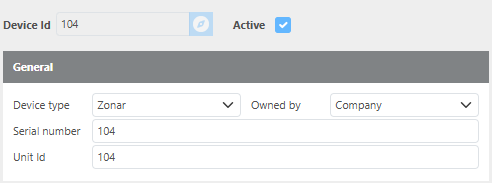
To begin tracking using Zonar, add the corresponding device to the truck or trailer's profile in the Tracking Device field.
Sync Driver HOS
To integrate HOS data with Zonar, the Ditat Driver ID must match the Zonar Driver External System ID.
Click here for more information about HOS.