
To access: Dispatch → Search
Use the Search screen to look up shipments and trips using a combination of filters and date ranges.
Filters For Search

|
Filters |
Description |
|
Bill To Customer Company |
Filters by the company name of the customer to be billed on the shipment. |
|
Bill To Customer Id |
Filters by the bill-to customer assigned to the shipment. |
|
Booked By Username |
Filters by the user listed in the Booked By field on the shipment. |
|
Booked For Username |
Filters by the user listed in the Booked For field on the shipment. |
|
Carrier Company |
Filters by the carrier's company name assigned to the trip. |
|
Carrier Id |
Filters by the carrier ID assigned to the trip. |
|
Customer Company |
Filters by the customer company assigned to the shipment. |
|
Delivery Date |
Filters by delivery date. |
|
Dispatched By Username |
Filters by the user who dispatched the trip. |
|
Driver Id |
Filters by driver ID. |
|
Driver Name |
Filters by driver name. |
|
Empty Driving Distance |
Filters by empty driving distance. |
|
From Address |
Filters by pickup address. |
|
From City |
Filters by pickup city. |
|
From Company |
Filters by pickup company name. |
|
From Location |
Filters by pickup location ID. |
|
From State |
Filters by pickup state. |
|
Loaded Driving Distance Pay |
Filters by loaded driving distance. |
|
Pickup Date |
Filters by pickup date. |
|
Reference 1 -5 |
Filters by the reference number in the specified reference field. |
|
Reference Id |
Filters by any reference number used on the shipment. |
|
Revenue |
Filters by revenue amount. |
|
Shipment Created By Username |
Filters by the user who created the shipment. |
|
Shipment Id |
Filters by shipment ID. |
|
Shipment Payment Status |
Filters by the shipment's payment status. |
|
Shipment Preassigned Trailer Id |
Filters by the trailer preassigned on the shipment. |
|
Shipment Status |
Filters by shipment status. |
|
To Address |
Filters by delivery address. |
|
To City |
Filters by delivery city. |
|
To Company |
Filters by delivery company name. |
|
To Location |
Filters by delivery location ID. |
|
To State |
Filters by delivery state. |
|
Trailer |
Filters by trailer assigned to the trip. |
|
Trip Id |
Filters by trip ID. |
|
Trip Status |
Filters by trip status. |
|
Truck |
Filters by truck assignment. |
|
UO Address |
Filters by unloaded origin address. |
|
UO City |
Filters by unloaded origin city. |
|
UO Company |
Filters by unloaded origin company name. |
|
UO Location Id |
Filters by unloaded origin location ID. |
|
UO State |
Filters by unloaded origin state. |
Saving Search Filters
Closing the Search screen using the green OK button will save your current filters for the next use. Clicking Reset will clear all filters back to their defaults.
Search Results
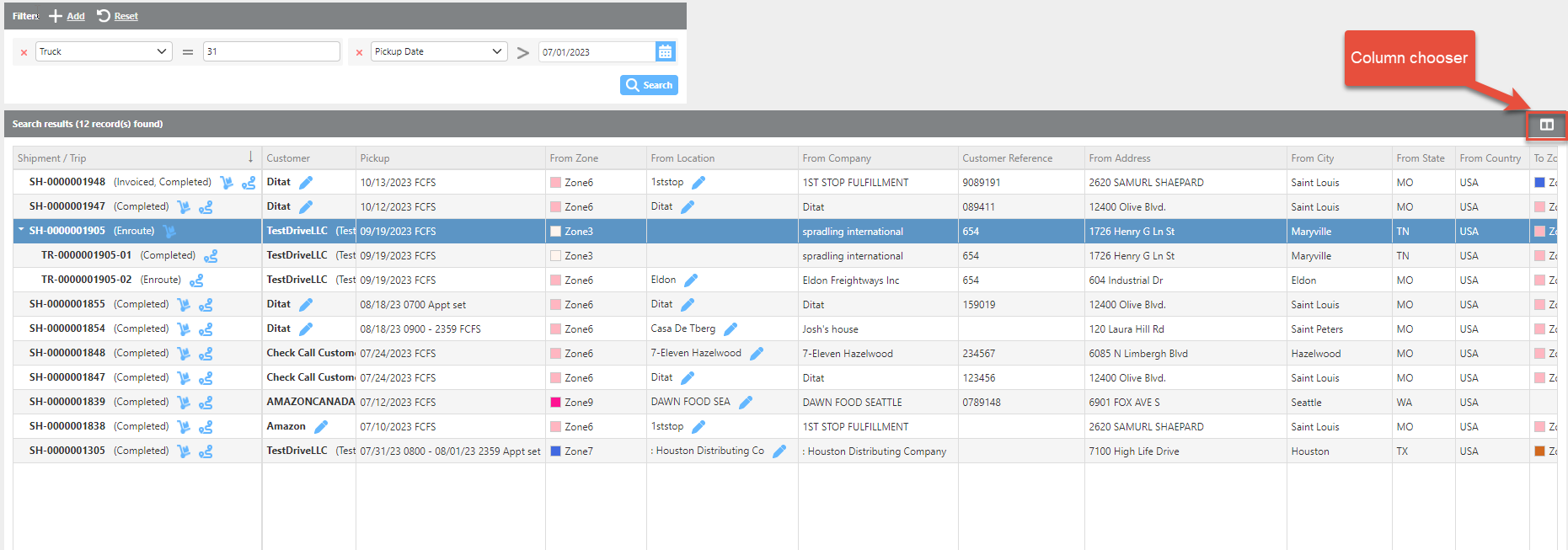
Search Results
Search results display all loads matching the selected filters. The results grid can be customized in the following ways:
-
Rearrange Columns – Click and drag column headers to reorder them.
-
Hide Columns – Use the Column Chooser icon and uncheck any columns you do not want to display.
-
Open Records – Click the pencil icon next to a record to open it.
-
Highlight a Row – Click on any row to highlight it.
Split Loads
For split loads, click the drop arrow next to the shipment to expand and view each individual leg of the trip.