
Account Settings
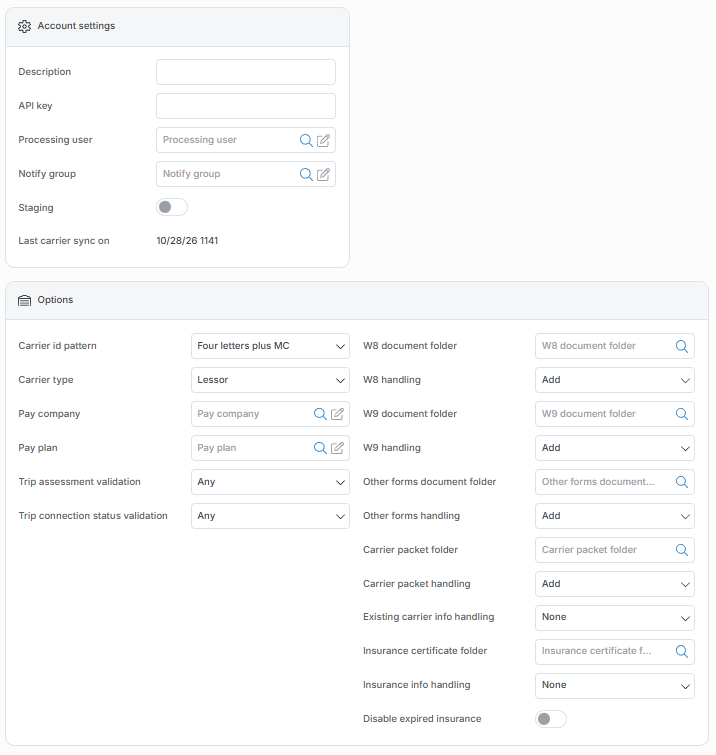
|
Field |
Description |
|---|---|
|
Account Settings |
|
|
Account Id |
Here enter the account id. Click here for information on how to use the record Id field. |
|
Description |
Enter a description for this account. |
|
API Key |
Enter the API Key here. |
|
Processing user |
Enter the Ditat user that should be used to enter the data. |
|
Notify group |
Select which Ditat user group should receive Highway notifications. |
|
Options |
|
|
Carrier Id pattern |
Select the format that should be used when creating the carrier Id. |
|
Carrier type |
Choose if carriers should be added as a Carrier or Lessor. (Carrier would be for brokerage, Lessor for owner-operators) |
|
Pay company |
Select which of your companies will be the pay company. |
|
Pay plan |
Specify a pay plan here if you would like new carriers to be set up with this pay plan attached. |
|
Trip assessment validation |
Any will allow a carrier with full pass, partial pass or no pass on a trip. Pass will require the carrier to have full pass to be used. Partial Pass will allow for partial pass status. |
|
Trip connection status validation |
Any will allow a carrier with any Highway onboarded status on a trip. Onboarded will require the carrier be onboarded in Highway. Needs to be onboarded but can remain active will allow the carrier to stay active but not use on a trip. |
|
W8 document folder |
Select which document management folder the W8 should be applied to. |
|
W8 handling |
Select how the W8 should be handled. |
|
W9 document folder |
Select which document management folder the W9 should be applied to. |
|
W9 handling |
Select how the W9 should be handled. |
|
Other forms document folder |
Select which document management folder the Other forms should be applied to. |
|
Other forms handling |
Select how the Other forms should be handled. |
|
Carrier packet folder |
Select which document management folder the carrier packet document should be applied to. |
|
Carrier packet handling |
Select how the carrier packet should be handled. |
|
Existing carrier info handling |
Select how the existing carrier information should be handled. |
|
Insurance certificate folder |
Select which document management folder the Insurance Certificate document should be applied to. |
|
Insurance info handling |
Select how insurance information should be handled. |
|
Disable expired insurance |
Check this box if you would like the system to disable expired insurance policies. Disabling will only occur when an update is received from Highway. Disabling will not take place when the Highway profile is refreshed in Ditat or manually updated. |
The Highway integration links carriers based on the DOT number, if you have a carrier with that was added with the wrong DOT number that carrier will not be updated through the Highway integration.