
This report can be run for trucks, trailers, or drivers. It displays the asset ID, days active and inactive, number of trips, miles, total revenue, and revenue per day for the selected date range.
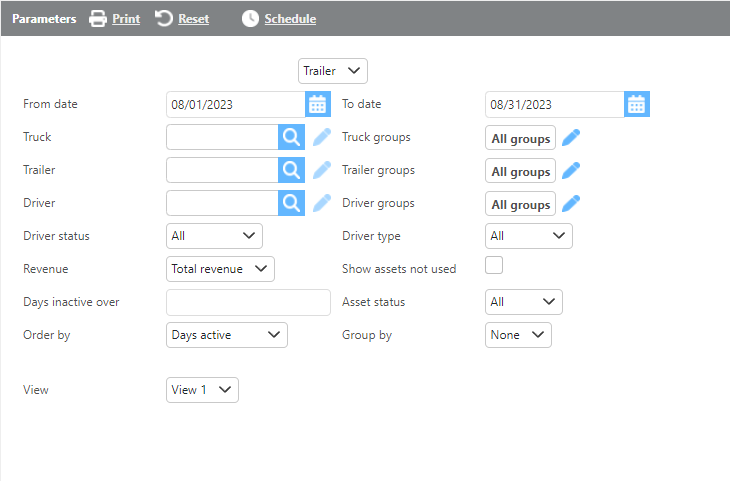
Report Parameters
|
Field |
Description |
|
Asset |
Select whether to run the report for Trucks, Trailers, or Drivers. |
|
From/To date |
Enter a date range to filter results. This date range looks at check calls submitted on trips. |
|
Truck |
Select a specific truck to filter results. |
|
Trailer |
Select a specific trailer to filter results. |
|
Driver |
Select a specific driver to filter results. |
|
Groups |
Select a custom group to limit results to assets within that group. |
|
Driver status |
Select a specific driver status to filter results, or select All. |
|
Driver type |
Select a specific driver type to filter results, or select All. |
|
Revenue |
Select whether the report should display Total Revenue or Linehaul Only. |
|
Show assets not used |
Check this box to include active assets that had no activity during the selected date range. |
|
Order by |
Select how the data should be ordered on the report. |
|
Group by |
Select if and how the data should be grouped on the report. |
View 1
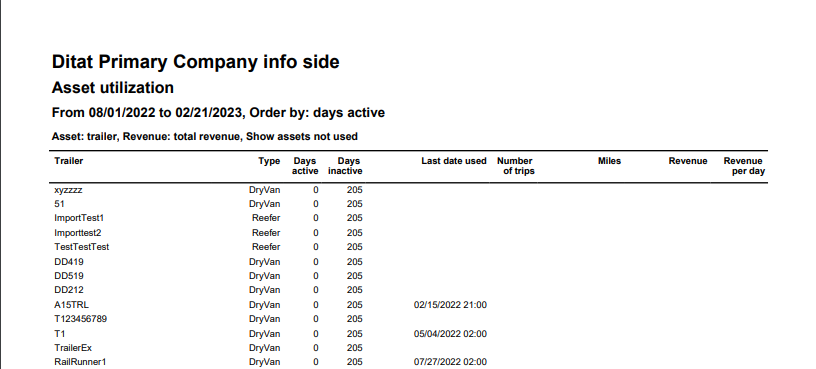
Report Columns View 1
|
Field |
Description |
|
Trailer/Truck/Driver |
The asset ID. |
|
Days active |
The number of days the asset was active during the date range. |
|
Days inactive |
The number of days the asset was inactive during the date range. |
|
Last date used |
The most recent date the asset was used. |
|
Number of trips |
The number of trips the asset was assigned to during the date range. |
|
Miles |
The total miles the asset traveled during the date range. |
|
Revenue |
The total revenue generated by the asset during the date range. |
|
Revenue per day |
The average revenue per day for the asset during the date range. |
View 2
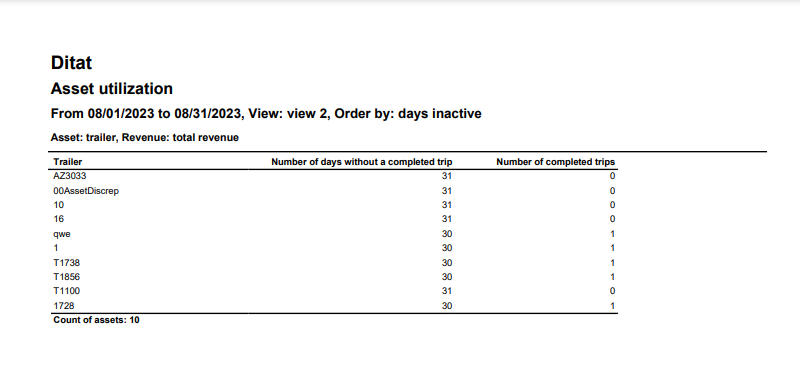
Report Columns View 2
|
Field |
Description |
|
Trailer/Truck/Driver |
The asset ID. |
|
Number of days without a completed trip |
The number of days within the date range that had no completed trips for this asset. |
|
Number of completed trips |
The total number of completed trips for this asset within the date range. |
Miles View
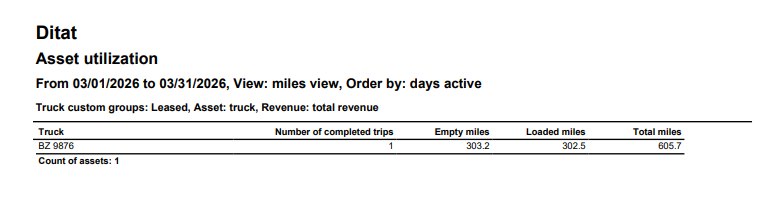
Report Columns Miles View
|
Field |
Description |
|
Trailer/Truck/Driver |
The asset ID. |
|
Number of completed trips |
The total number of completed trips for this asset within the date range. |
|
Empty Miles |
Total empty miles for the asset. |
|
Loaded Miles |
Total loaded miles for the asset. |
|
Totals Miles |
Total miles for the asset. |