
This report displays assets that were deactivated within the selected date range.
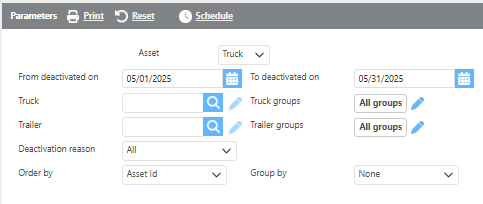
Report Parameters
|
Field |
Description |
|---|---|
|
Asset |
Select the asset type to run the report for. |
|
From/To deactivated on |
Enter a deactivation date range. Only assets deactivated within this range will display. |
|
Truck |
Select a specific truck to filter results, or leave blank to include all trucks. |
|
Trailer |
Select a specific trailer to filter results, or leave blank to include all trailers. |
|
Custom Groups |
Select a custom group to filter results, or leave blank to include all groups. |
|
Deactivation reason |
Select a deactivation reason to filter results. |
|
Order by |
Select how the results should be ordered. |
|
Group by |
Select if and how the data should be grouped on the report. |

Report Columns
|
Field |
Description |
|---|---|
|
Asset Id |
The asset ID. |
|
Deactivation date |
The date the asset was deactivated. |
|
Deactivation reason |
The reason the asset was deactivated. |
|
Year |
The asset's year. |
|
Make |
The asset's make. |
|
License |
The asset's license plate number. |
|
Vin |
The asset's VIN number. |
|
Miles |
The asset's total miles, including Ditat trip-calculated miles plus the initial miles entered on the asset profile. |