
This report displays a summary of trailer inspections, including the trip number and delivery date.
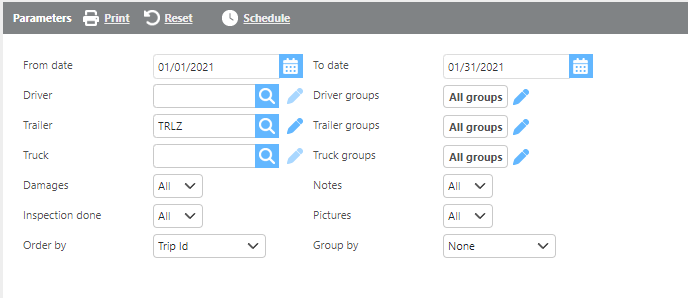
Report Parameters
|
Field |
Description |
|
From/To date |
Enter a date range to run the report. |
|
Driver |
Select a specific driver to filter results. |
|
Trailer |
Select a specific trailer to filter results. |
|
Truck |
Select a specific truck to filter results. |
|
Groups |
Select a custom group to limit results to assets within that group. |
|
Inspection done |
Select Yes to show only trips with an inspection, No to show only trips without an inspection, or All to include both. |
|
Order by |
Select how the data should be ordered on the report. |
|
Group by |
Select if and how the data should be grouped on the report. |

Report Columns
|
Field |
Description |
|
Trip |
The trip number associated with the inspection. |
|
Delivery date |
The delivery date of the trip. |
|
Trailer Id |
The trailer ID. |
|
Truck Id |
The truck ID. |
|
Driver Id |
The driver ID. |
|
Dispatched by |
The user who dispatched the load. |
|
Inspection done |
Indicates whether an inspection was completed for this trip. |
|
Completed on date |
The date the trip was completed. |
|
Reefer |
Indicates whether the trailer is a reefer. |
|
Reefer fuel |
The reefer fuel information from the inspection. |
|
Reefer oil |
The reefer oil information from the inspection. |
|
Avg tire pressure |
The average tire pressure recorded during the inspection. |
|
Avg tread depth |
The average tread depth recorded during the inspection. |
|
Picture |
Indicates whether photos were added to the inspection. |
|
Notes |
Indicates whether additional notes were added to the inspection |