
This report displays a detailed list of trucks including license, year, make, engine details, in-service date, purchase date, and other information.
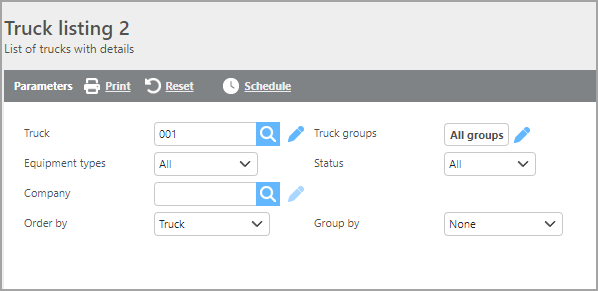
Report Parameters
|
Field |
Description |
|
Truck |
Select a specific truck to filter results. |
|
Truck groups |
Select a truck group to limit results to trucks within that group. |
|
Equipment types |
Select a specific equipment type to filter results, or select All. |
|
Status |
Select which truck status should be included in the report. |
|
Company |
Select the company to run the report for. |
|
Order by |
Select how the data should be ordered on the report. |
|
Group by |
Select if and how the data should be grouped on the report. |

|
Field |
Description |
|
Truck |
The truck ID. |
|
Owner |
The name of the carrier that owns the truck. |
|
License |
The truck's license plate number. |
|
Year |
The truck's year. |
|
Make |
The truck's make. |
|
Vin |
The truck's VIN number. |
|
Make |
The make of the engine in the truck. |
|
Model |
The model of the engine in the truck. |
|
Horsepower |
The truck's horsepower. |
|
In service date |
The date the truck was placed in service. |
|
Purchase date |
The truck's purchase date. |
|
Insured amount |
The amount the truck is insured for. |
|
Financed by |
The entity that finances the truck. |
View 2
View 2 is designed as a data dump intended to be exported to Excel.