
This report displays a detailed list of trailers including make, model, year, VIN, plate number, purchase date, in-service date, drop location, reefer serial number, and leasing company.
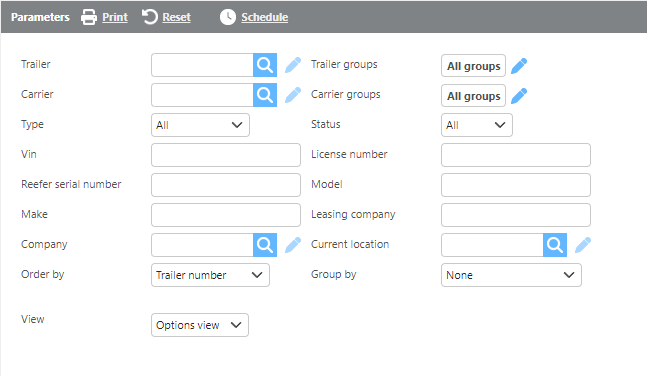
Report Parameters
|
Field |
Description |
|
Trailer |
Select a specific trailer to filter results. |
|
Carrier |
Select a specific carrier to filter results. |
|
Groups |
Select a custom group to limit results to trailers within that group. |
|
Type |
Select which type of trailers should be included. |
|
Status |
Select the trailer status to filter results: Active, Inactive, or All. |
|
Vin |
Enter a VIN number to filter results. |
|
License number |
Enter a license plate number to filter results. |
|
Reefer serial number |
Enter a reefer serial number to filter results. |
|
Model |
Enter a trailer model to filter results. |
|
Make |
Enter a trailer make to filter results. |
|
Leasing company |
Enter a leasing company to filter results. |
|
Company |
Select a company to filter results to trailers associated with that company. |
|
Current location |
Select a location to display only trailers currently at that location. |
|
Order by |
Select how the data should be ordered on the report. |
|
Group by |
Select if and how the data should be grouped on the report. |
|
View |
Select which view to use. See view descriptions below. |
View 1

Report Columns View 1
|
Field |
Description |
|
Trailer |
The trailer ID. |
|
Carrier |
The carrier ID associated with the trailer. |
|
Make |
The trailer's make. |
|
Model |
The trailer's model |
|
Year |
The trailer's year. |
|
Vin |
The trailer's VIN number. |
|
Plate number |
The trailer's license plate number. |
|
Purchase date |
The trailer's purchase date. |
|
Purchase price |
The trailer's purchase price. |
|
In service date |
The date the trailer was placed in service. |
|
Location |
The current location of the trailer. |
|
Reefer serial number |
The reefer unit serial number, if applicable. |
|
Leasing company |
The leasing company associated with the trailer, if applicable. |
Options View
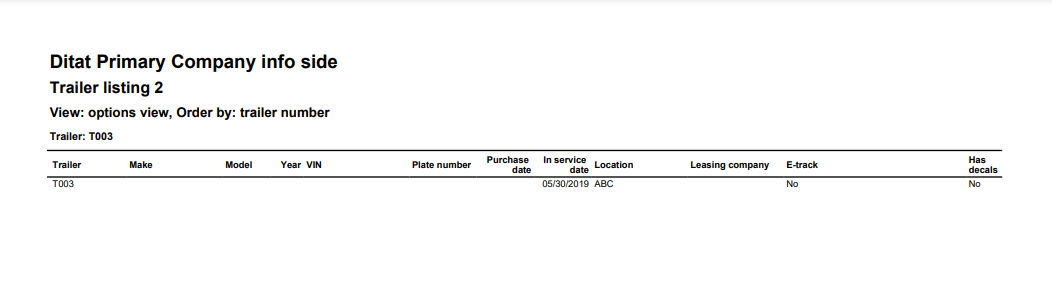
Report Columns Options View
|
Field |
Description |
|
Trailer |
The trailer ID. |
|
Make |
The trailer's make. |
|
Model |
The trailer's model. |
|
Year |
The trailer's year. |
|
Vin |
The trailer's VIN number. |
|
Plate number |
The trailer's license plate number. |
|
Purchase date |
The trailer's purchase date. |
|
Purchase price |
The trailer's purchase price. |
|
In service date |
The date the trailer was placed in service. |
|
Location |
The current location of the trailer |
|
Leasing company |
The leasing company associated with the trailer, if applicable. |
|
E-Track |
Indicates whether the trailer has E-tracks, along with the descriptive text from the trailer profile. |
|
Has Decals |
Indicates whether the trailer has decals. |
View 3
View 3 is designed as a data dump intended to be exported to Excel.