
This report is designed to display revenue that one company owes another for loads booked for secondary companies within your account.
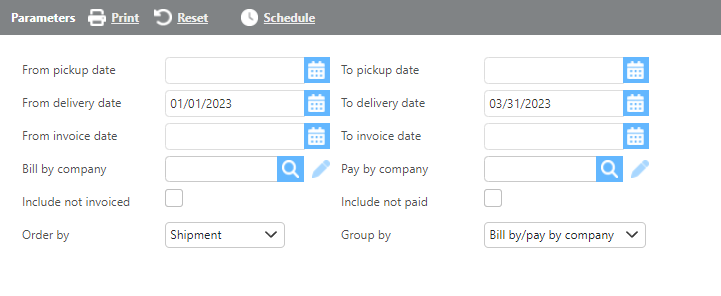
|
Field |
Description |
|
From/to pickup date |
Select a pickup date range to filter results. |
|
From/to delivery date |
Select a delivery date range to filter results. |
|
From/to invoice date |
Select an invoice date range to filter results. |
|
Bill by company |
Select a specific bill-by company to filter results, or leave blank to include all companies. |
|
Pay by company |
Select a specific pay-by company to filter results, or leave blank to include all companies. |
|
Include not invoiced |
Check this box to include loads that have not yet been invoiced. |
|
Include not paid |
Check this box to include loads that have not yet been paid. |
|
Order by |
Select how you would like the results ordered. |
|
Group by |
Select how you would like the results grouped. |
|
Field |
Description |
|---|---|
|
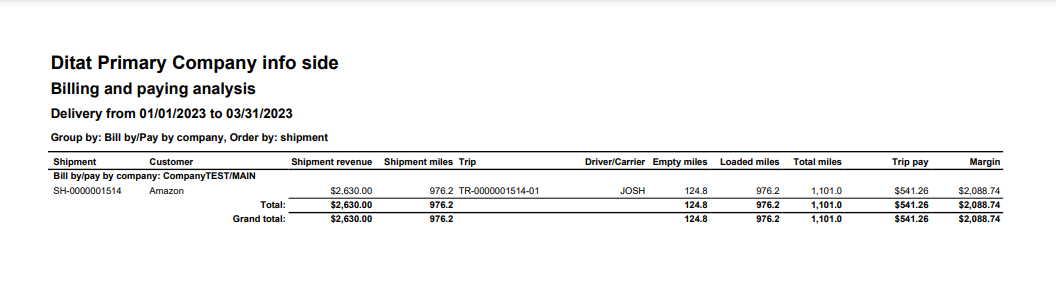
Shipment |
The shipment number. |
|
Customer |
The customer associated with the shipment. |
|
Shipment revenue |
The revenue from the shipment. |
|
Shipment miles |
The miles from the shipment. |
|
Trip |
The trip number. |
|
Driver/carrier |
The driver or carrier assigned to the trip. |
|
Empty miles |
The empty miles from the trip. |
|
Loaded miles |
The loaded miles from the trip. |
|
Total miles |
The total miles (empty + loaded) for the trip. |
|
Trip pay |
The carrier or driver pay for the trip. |
|
Margin |
The margin, calculated as revenue minus trip pay. |