
This report displays any duplicated charge types found on shipments, helping to identify and correct potential billing errors before invoicing.
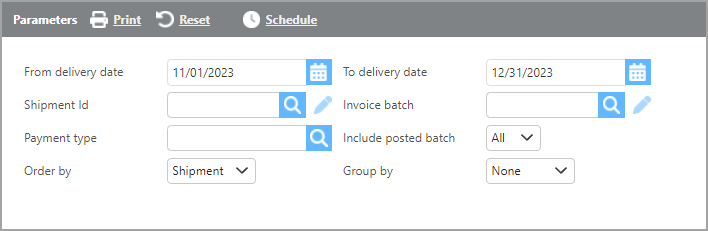
Report Parameters
|
Field |
Description |
|---|---|
|
From/to delivery date |
Select a delivery date range to filter results. |
|
Shipment Id |
Enter a specific shipment ID to see results for that shipment only, or leave blank to include all shipments within the date range. |
|
Invoice batch |
Enter an invoice batch number to narrow results, or leave blank to include all shipments within the date range. |
|
Payment type |
Select a specific payment type to filter results, or leave blank to include all payment types. |
|
Include posted batch |
Select whether to include shipments that have already been posted on an invoice batch. |
|
Order by |
Select how you would like the results ordered. |
|
Group by |
Select how you would like the results grouped. |
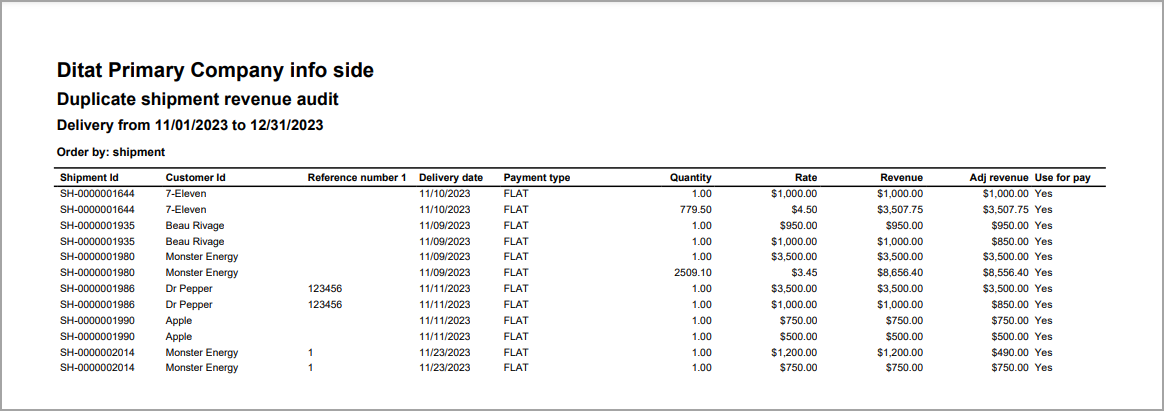
|
Field |
Description |
|---|---|
|
Shipment Id |
The shipment ID where the duplicate charge line was found. |
|
Customer Id |
The customer ID from the shipment. |
|
Reference number 1 |
The information from reference field 1 on the shipment. |
|
Delivery date |
The shipment delivery date. |
|
Payment type |
The payment type of the duplicate charge line. |
|
Quantity |
The quantity from the duplicate charge line. |
|
Rate |
The rate from the duplicate charge line. |
|
Revenue |
The revenue amount from the duplicate charge line. |
|
Adj revenue |
The adjusted revenue from the duplicate charge line. |
|
Use for pay |
Indicates whether the Use for Pay checkbox is checked on the charge line. |