
This report will show cancelled shipments by a specified date range.
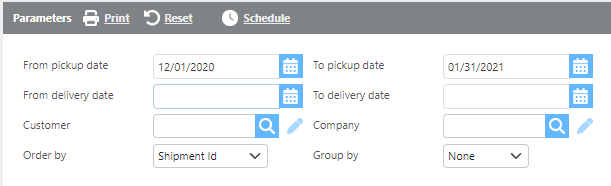
Report Parameters
Recommendation:
Use fewer filters to provide a broader data set for analysis.
|
Field |
Description |
|
From/To pick up date |
Select a pickup date range to filter cancelled shipments. |
|
From/To Delivery date |
Here select a delivery date range for shipments to view. |
|
Customer |
Select a specific customer, or leave blank to include all customers. |
|
Company |
Select a specific company or leave blank to include all companies. |
|
Order by |
Select how you would like the shipments ordered on the report. |
|
Group by |
Select if/how you would like the shipments grouped. |

Report Columns
|
Field |
Description |
|
Shipment Id |
The unique id number for the shipment. |
|
Cancelled time |
The date/time the shipment was cancelled. |
|
Customer |
The ID of the customer associated with the shipment. |
|
Booked by |
The user that cancelled the shipment. |
|
Pickup location |
The city, state, and zip code of the pickup location. |
|
Pickup date |
The scheduled date and time for the pickup. |
|
Delivery location |
The city, state, and zip code of the delivery location. |
|
Delivery date |
The scheduled date and time for the delivery. |
|
Note |
Notes associated with the shipment record. |
|
Note created by |
The user that created the note. |